







Work AI doesn’t stick because of models and features. It sticks when people see value in their workflows and then share them. At Nextdoor, we didn’t just “launch a platform.” We built a learning loop that turned early curiosity into everyday habits: a cadence of office hours, peer tips in Slack, quick wins highlighted in bulletins, and targeted in-product guidance that met people at the moment of need. That loop transformed pockets of experimentation into company-wide capability.
Our belief: The key to driving sustained adoption is to integrate AI directly into where employees already work, by connecting the systems they rely on daily and seamlessly embedding intelligence into those workflows, rather than introducing additional layers of process or complexity.
Why We Started
Like many growing companies, knowledge was scattered across various platforms. But the problem wasn’t the lack of information– it was the cost of finding it at the right moment, with the right context.
Teams were scaling fast. Projects were moving faster. People were spending more time chasing answers than creating impact. We needed a way to make knowledge discoverable, actionable, and safe.
That’s where the idea of Work AI clicked: one intelligent layer that connected people to information instantly, across systems, without adding friction or new processes.
From platform to practice: what actually changed
We connected the core systems employees already live in to Glean, so answers and actions could happen in one place instead of eight tabs. The goal wasn’t “more AI.” It was less friction: one place to ask, one place to act, with permission-aware context every time.
We anchored our Glean rollout in four lightweight moves people could engage with in minutes, not months:
- A dedicated Slack support channel where questions, peer tips, and “show-and-tell” wins flow in the open.
- Live office hours that shifted over time: weekly early on to build confidence; then monthly company-wide plus weekly team-led learning sessions as expertise localized.
- Bite-sized updates in company bulletins to spark action without more meetings.
- Purposeful gamification recognizing the top three Agent builders, Assistant power users, and Search adopters — celebrating diverse ways to win.
Signals, not slogans: how we knew it was working
We believe that a successful learning loop should create its own telemetry. Ours did.
Early in rollout, the data showed us steady engagement beyond the pilot cohort, and that people started where they lived. For some teams, Google Drive drove the majority of clicks and citations; for others, it was Slack, Confluence, or Coda.
We took these as clear cues for team-specific content curation and connector tuning, to meet each team where they were. We also pushed the Glean Chrome extension by default, to make it easier to begin engaging.
Following the signals helped us ensure that adoption felt human and accessible. People didn’t have to learn a new system to try AI; they just learned to ask better questions in the places they already worked.
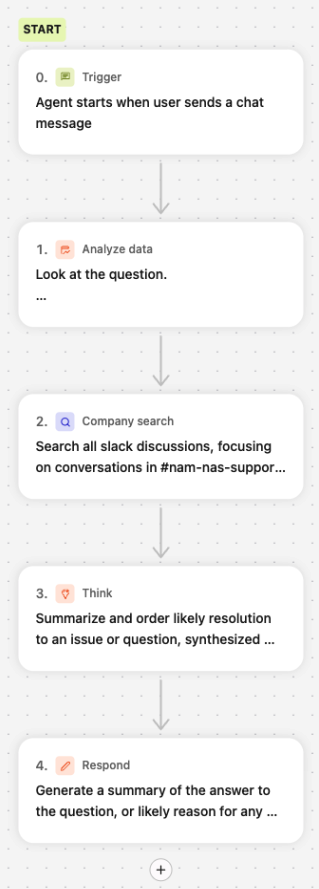
Example: A Typical Agent Flow
Nextdoor’s Most Exciting Use Cases
- People Operations: Meet Finn, your open enrollment guide
Every year, open enrollment floods People teams with repeat questions. Finn, our friendly agent for the 2026 plan year, explains what’s new, compares medical/dental/vision options, points employees directly to the right Workday actions, and spotlights perks and wellness programs they might be missing. HR handles fewer repeat tickets; employees make confident choices and hit deadlines with time to spare. - People Operations: Meet Finn, your open enrollment guide
Every year, open enrollment floods People teams with repeat questions. Finn, our friendly agent for the 2026 plan year, explains what’s new, compares medical/dental/vision options, points employees directly to the right Workday actions, and spotlights perks and wellness programs they might be missing. HR handles fewer repeat tickets; employees make confident choices and hit deadlines with time to spare. - Sales: Instant client intelligence for deeper engagement
Account execs no longer burn hours stitching together advertiser context. Type a brand, and the sales agent pulls up-to-date business signals from the web, pairs them with our internal history (campaign performance, interactions, support context), and delivers 1–5 tailored insights formatted for action. Reps show up prepared — with timely talking points and angles that fuel stronger conversations. - Business Operations: Expert Trust & Safety analysis
Protecting users means reviewing lots of potential fraud quickly and consistently. Our T&S agent compiles user history, policy links, similar past cases, and flagged behaviors into a structured assessment with recommended actions and evidence. Analysts stay in the loop and in control — but now they can process more cases, with higher consistency, and spend their judgment where it matters most. - Product & Development: Technical references, on demand
Instead of digging through code or stale docs, engineers now ask natural-language questions and get verified answers pulled from current code and technical documentation — no speculation, no guesswork. - This self-serve capability significantly streamlines workflows, boosting individual productivity by 2–3x versus manual searching or contacting an engineer. It also reduces engineer context-switching by providing easy access to answers. Beyond simple lookups, the agent identifies last deploys, explains feature implementations, uncovers code limitations (beyond GQL), and has already delivered up to 2x time savings in tasks like finding reference documents and mutation details.
- Revenue Operations: Data enrichment at RevOps speed
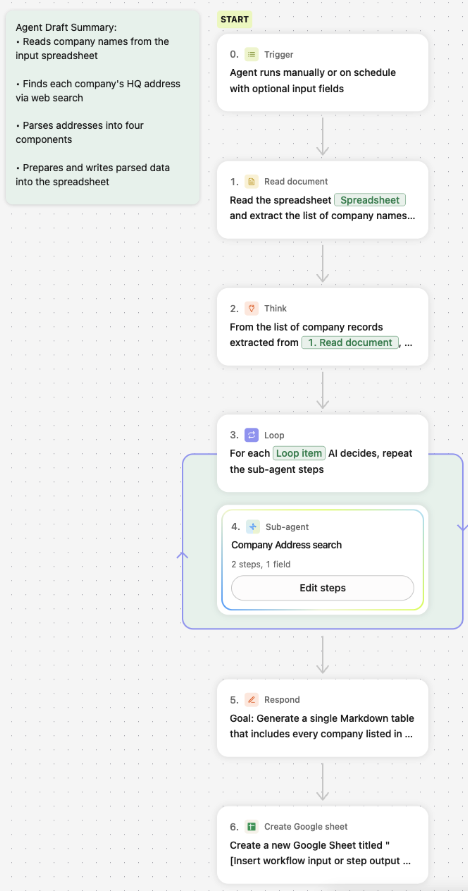
RevOps used to spend 1–2 hours per 50 accounts hunting down addresses and hand-entering them into Salesforce. The address enrichment agent ingests a CSV, batches the work, performs automated lookups, and outputs a clean, validated file (or pushes straight to Sheets) in about 5–6 minutes. That’s time back, accuracy up. See Figure 2 for the RevOps address enrichment flow.
The plays behind the outcomes
- Reduce friction to first win
SSO, Slack integration, a Chrome extension, and a no-code agent builder meant people could try ideas immediately. No IT tickets, no waiting. - Bring AI to the work
We connected the systems that matter most so employees could search once, cite once, and act anywhere — with permissions respected end-to-end. - Curate and reuse, don’t reinvent
An agent directory, micro-workshops, and “Agent Wins” patterns helped teams remix what worked instead of starting from zero. Each plays a unique role in helping teams remix proven solutions rather than starting from scratch.- Agent Directory: A centralized, searchable resource connecting teams with subject matter experts and proven solutions, ensuring know-how isn't siloed and accelerating collaboration.
- Team-level micro-workshops: Focused demos of effective tools and methods for quick, relevant learning with team-specific nuance.
Cross-functional sharing of “Agent Wins”: Documented case studies and reusable blueprints that capture context, steps, and outcomes of successful agent implementations. This creates a living library of proven approaches, promoting a culture of continuous improvement.
Conclusion: what’s next and practical takeaways
In the near future, AI literacy will feel as normal as data literacy. Every team will have someone who can build or guide an agent. Org design will evolve from “centers of excellence” to distributed “centers of enablement,” where business experts and technologists co‑create. The companies that win will blend human judgment and intelligent automation, and treat AI as a shared capability — not a siloed function.
Practical takeaways to move from literacy to everyday practice:
- Start with humans, not features: anchor in Slack, office hours, and two or three great agents people can try today.
- Share weekly “what’s working” signals in the open. Make learning visible.
- Keep touchpoints short and frequent: one link to click, one agent to try.
- Close the loop publicly: show what changed because of employee feedback. Trust compounds.
Our learning loop — Slack, office hours, quick-win storytelling, and in-product guidance — didn’t just “launch AI.” It made Work AI feel like how we already work: collaborative, fast, and grounded in real outcomes. That’s the human side of Work AI — build the conditions, and let the community pull the value forward.
