Generative AI for software engineers does more than complete code. The next wave of productivity gains comes from helping engineers find context, navigate incidents, and ship safely across the systems where code actually lives.
GitHub Copilot already writes nearly half of the average developer's code — yet a recent controlled study found experienced developers using AI tools took 19% longer to complete tasks, even though they believed AI had sped them up by 20%.
The bottleneck isn't typing anymore. It's the system of context around the code, and most engineering stacks haven't built the layer that supplies it.
At a glance
- AI coding assistants solved a problem engineers no longer have. The real drag is reconstructing context across GitHub, Jira, Slack, observability tools, design docs, and wikis.
- A two-layer AI stack — coding surfaces above, a shared context layer below — is becoming the architectural pattern that separates teams getting real ROI from those running disconnected pilots.
- Trust, governance, and explainability now matter as much as model quality. 45% of AI-generated code contains at least one high-severity vulnerability.
- The teams getting measurable wins from AI in engineering — including LinkedIn, Uber, and two of the top three coding-assistant organizations — are standardizing on a shared context layer that every tool can call into.
- Engineering leaders evaluating AI tools should ask four questions: What context does it have? How is trust earned? Where does data go? Does it fit how teams already work?
The AI productivity paradox in engineering
Three gaps keep showing up in conversations with engineering leaders, and together they explain why AI in the SDLC feels like it should be working better than it is.
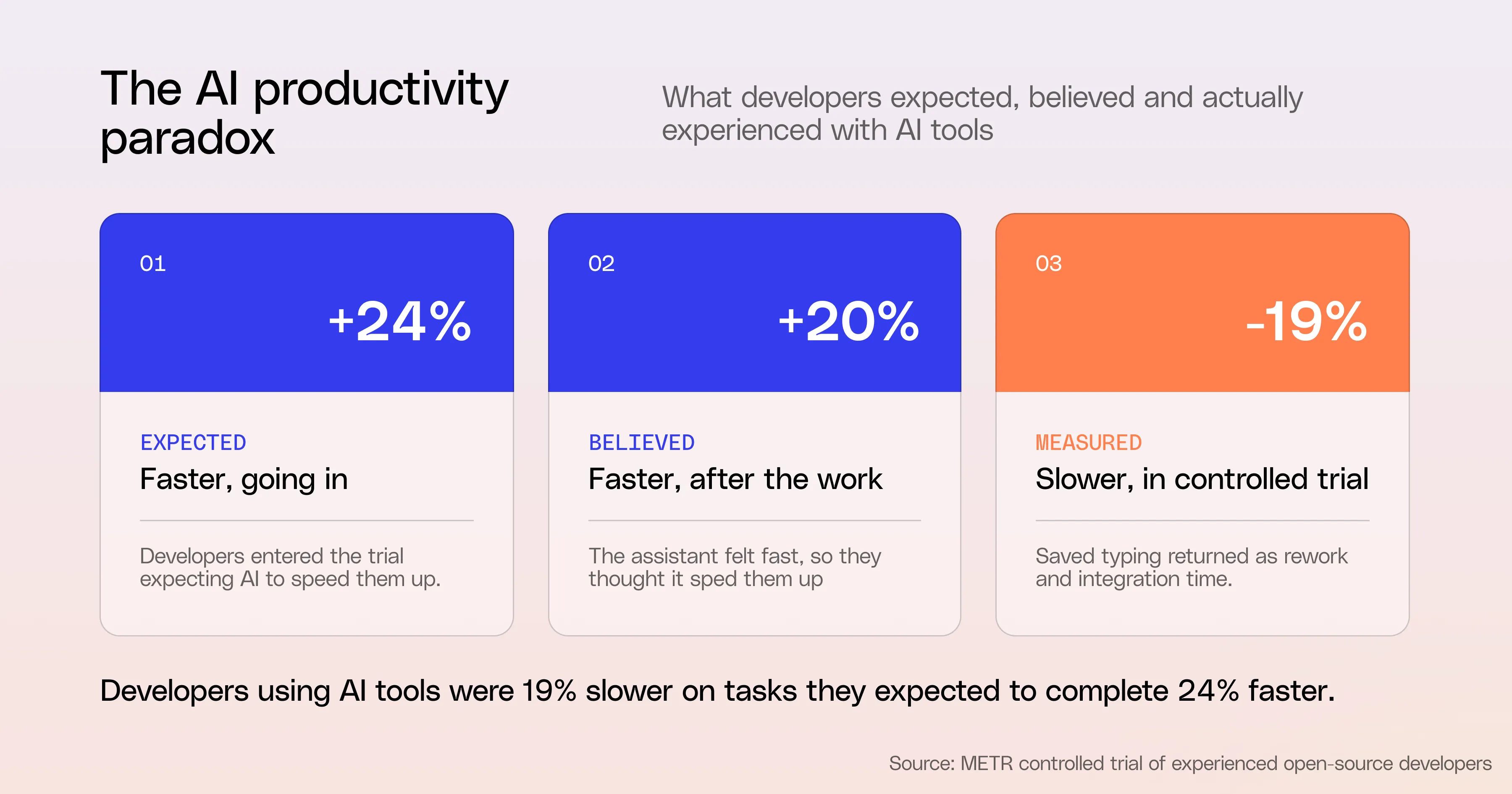
The outcome gap. In a randomized controlled trial of experienced open-source developers, issues where developers were allowed to use AI tools took 19% longer to complete. The developers expected to be 24% faster going in.
They believed afterward that AI had sped them up by about 20%. The assistant is always suggesting code, so the work feels faster — but with only file-level or repo-level context, it often misses constraints from tickets, designs, and other services. The typing time saved comes back later as rework and integration.
The trust gap. Over time, the productivity illusion creates a confidence problem. More developers actively distrust the accuracy of AI tools than trust them — roughly 46% versus 33%. 66% say their biggest frustration is AI solutions that are "almost right, but not quite." 45% say debugging AI-generated code often takes longer than writing it themselves. When the assistant has limited context, it produces plausible code that doesn't quite line up with the surrounding system, and engineers spend the saved time hunting down the mismatch.
The safety gap. Security reviews are surfacing real risks. In some analyses, close to 45% of AI-generated code contained at least one high-severity vulnerability, including XSS or SQL injection.
Without strong guardrails, real context, and clear review patterns, AI can quietly increase your attack surface even as it helps ship features faster. The issue isn't AI in the SDLC. The issue is that the layer around the AI matters as much as the AI itself.
The pattern across all three gaps is the same. Coding assistants are excellent at the part of the job that was already mechanized in everyone's brain. They're less helpful at the part that requires understanding the rest of the system — which is most of the work.
Why the bottleneck moved from code creation to context assembly
For decades, the limiting factor in shipping software was how quickly an engineer could turn intent into code. That equation has changed.
In many organizations — especially the AI-native ones — senior engineers have stopped writing code line by line. They define intent, set constraints, and review diffs while systems handle much of the mechanical work.
The real bottleneck is no longer how fast someone can produce code. It's how quickly they can assemble the right context, guardrails, and workflows around that code so it's correct, safe, and aligned with the right architecture.
Look at where an engineer's time actually goes on a typical day.
Open a Jira ticket. Switch to the design doc linked in the ticket.
Switch to the Slack thread where the trade-offs were discussed.
Switch to the runbook for the service.
Switch to a past incident postmortem.
Switch to GitHub to find the last person who touched this code path.
Switch back to the IDE to actually write the change. Then back to the PR review thread when the change lands.
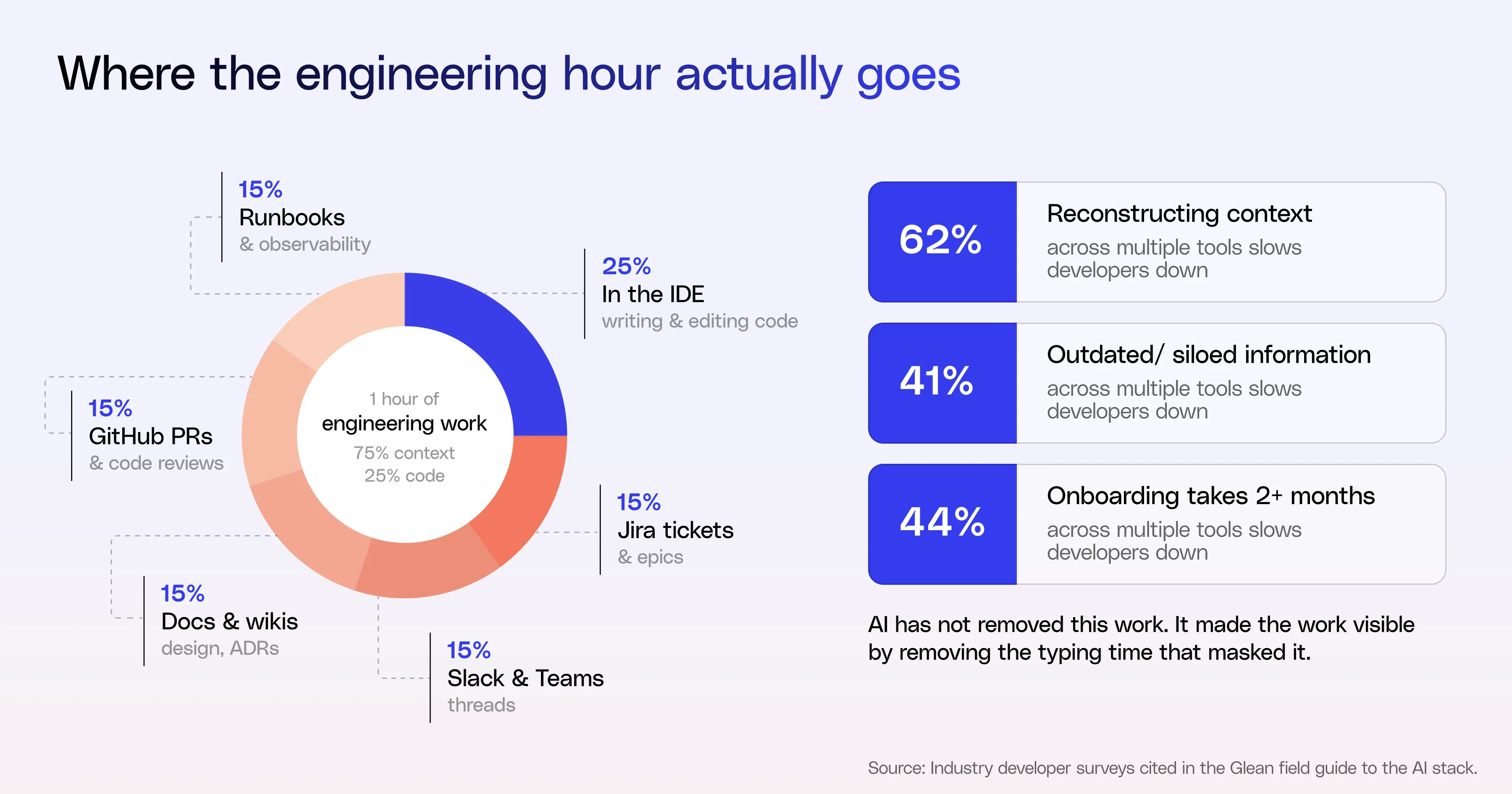
The IDE is one tab in a chain of five or six. The coding assistant lives in that one tab. It cannot see the rest of the chain. When it generates a code suggestion, it's reasoning over the file in front of it — not the ticket that explains why the change exists, the design decision that ruled out three other approaches, or the incident from last quarter that explains a load-bearing comment in the legacy code.
That gap shows up in the data. 62% of developers say reconstructing context across multiple tools slows them down. 41% identify outdated, inconsistent, or siloed information as their biggest productivity drain. 44% of organizations report that onboarding new developers takes more than two months, and the time goes almost entirely to context assembly — finding the right docs, the right people, the right past decisions.
AI has not removed this work. In many cases, it has made the work more visible by removing the typing time that used to mask it. The result: friction, not features, is the real drag.
The two-layer model: coding surfaces and context surfaces
If you look across the AI tools in the modern engineering stack, a pattern shows up.
One set of tools is where engineers do the work. IDEs, code hosts, Jira, chat, AI coding environments like Cursor or Claude Code. These are the surfaces where intent becomes changed.
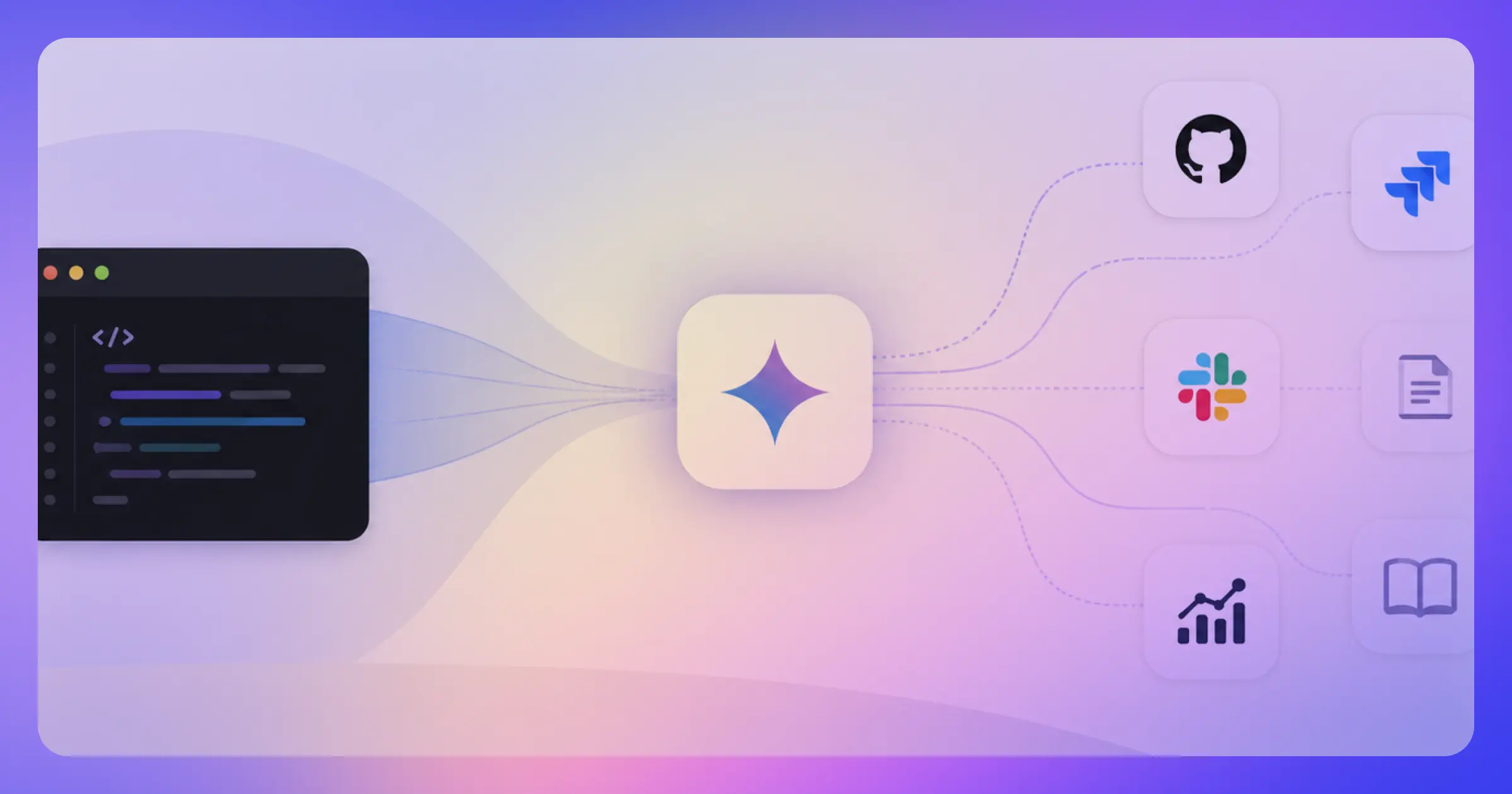
Another set focuses on understanding the work. They pull together code, tickets, incidents, docs, logs, and people into a coherent picture. They answer questions like: how do our services relate across teams and repos? Which incidents, tickets, and design docs are tied to this change? Who owns this system now, and what constraints did we agree on?
For many teams, this division of labor is leading to the formation of a two-layer model: a coding surface above, a context surface below.
The context layer connects to the main systems
GitHub or GitLab and other hosts, Jira, incident tools, observability platforms, wikis, document stores, Slack or Teams, and more. It indexes code and documents with hybrid search — lexical and semantic — so it understands your stack, your naming, and your jargon.
It builds an enterprise graph linking services, APIs, incidents, tickets, owners, and design artifacts, instead of treating everything as flat text. And it respects security and governance boundaries end to end: source-system ACLs, data residency, auditability.
The coding layer is where engineers spend most of their time day to day.
IDEs and AI-forward coding environments, GitHub and other code hosts, Jira and work tracking, Slack and Teams. These surfaces provide powerful capabilities and automation, but they can't tap into existing enterprise context unless that context is resupplied and reinvented for every query.
Platforms designed for the context layer — like Glean — connect to the main engineering systems and expose a permission-aware enterprise graph that other AI tools can call into. Two of the top three coding-assistant organizations rely on Glean to power the context layer behind their engineering tools.
The reason this division matters: coding surfaces are excellent at local generation and editing, but they're built around the file or the repo. A dedicated context layer lets teams keep the editors they already trust while gaining the cross-system understanding they're missing.
You index once. You reuse that context across tools and surfaces.
How the two-layer model plays out: onboarding, daily coding, and incidents
The two-layer model isn't an abstract framework. It changes three workflows where engineers spend most of their hours.
Onboarding and service understanding.
Ownership changes constantly. New hires join, teams reshuffle, services outlive their original authors. The information a new engineer needs to get up to speed is usually scattered across old design docs and ADRs, Jira tickets and epics, PRs and code reviews, incident reports and runbooks, Slack threads, and email chains.
Nearly half of organizations say onboarding takes more than two months. When developers use AI tools with a real context layer underneath, 43% say onboarding time drops to less than a month.
With Glean Search and Glean Chat sitting on the Enterprise Graph, a new engineer can ask "give me an overview of the payments service and link key design docs" and get an answer assembled from code, tickets, incidents, and ownership — not just from whatever happens to match the keyword "payments" in code comments.
Day-to-day coding and routine changes.
A lot of engineering time disappears into routine work: config tweaks, minor bug fixes, incremental refactors that keep systems healthy but pull focus from bigger projects. IDE coding assistants are already strong in this lane.
Paired with code search and code-writing agents, they can even propose scoped changes directly from a Jira ticket or Slack thread instead of starting from a blank editor. The teams getting production-ready results from this take one more step: they define clear change classes where AI is allowed to propose edits — log-level changes, certain config updates, non-behavioral refactors, documentation and tests — and they treat comments, design docs, and linked tickets from the context layer as guardrails.
The suggestions line up with real requirements and constraints, not just generic patterns the model has seen before.
Incidents and production support.
During an incident, engineers are juggling alerts, dashboards, logs, runbooks, Jira, and Slack while trying to answer three basic questions: what changed, what's broken, and who needs to be involved. The context-switching alone slows everything down.
79% of engineering teams are already exploring AI for incident tracking tasks. With a context platform underneath, Glean Agents can summarize alerts, traces, and logs into a coherent narrative, pull in related tickets, recent code changes, past incidents, and owners into a single view, and draft first-pass timelines, postmortems, and customer updates based on real events and artifacts.
The split between the two layers is easiest to see here. Observability tools provide the raw signals — metrics, traces, logs. Coding assistants help propose and apply code-level fixes once you know what's wrong. The context layer connects the dots across systems so the assistant isn't guessing from one tool's data.
In all three workflows, the coding assistant matters. It matters more when it's calling into a layer that already knows the rest of the system.
Four questions to ask before adding another AI tool

To move from experimentation to something you can standardize on, it helps to have a common set of evaluation questions. These come up repeatedly in conversations with engineering leaders.
1. What context does it actually have?
Most tools claim to be "context-aware." The real question is: context over what?
Does it only see the current repo or buffer, or can it also see the related tickets, incidents, design docs, and runbooks?
Can it follow a chain like Slack alert → incident ticket → relevant code changes → owners → past incidents, or does someone still have to glue that together by hand?
How does it behave with monorepos, multiple code hosts, and polyglot stacks — has it been tested at that scale, or is that "future work"?
If the tool can't see the same graph your engineers reason over, it will give shallow or misleading answers.
2. How is trust earned, not assumed?
Engineers will not trust a system that behaves like a black box, no matter how slick the UI is. Are answers grounded in your own artifacts — code, tickets, logs — with links back so people can inspect the source?
Are outputs cited and explainable, or do they look like a wall of text you have to manually re-validate?
What happens on bad input or edge cases in incidents and change workflows — does it fail safe and visible, or quietly hallucinate?
If people have to redo the work to check it, you won't get real adoption.
3. Where does your data go, and who can act on it?
Once AI can read code, logs, and tickets — and especially once it can take actions — you're making a security and governance decision, not just a tooling decision.
Where are the indexes for code and documents hosted: your tenant, the vendor's multi-tenant, something else?
Do code and logs stay inside your VPC or cloud account, and are there tight egress controls on what agents and code writers can send to external models?
Are all queries and actions logged in a way your security team can use for review and incident response? If you can't answer these cleanly, your security team will block — or should.
4. Does it fit the way your teams already work?
The best tools disappear into existing workflows. The worst ones ask engineers to live in a new tab. Does it integrate cleanly with GitHub or GitLab, Jira, your observability stack, and Slack or Teams, or is it yet another disconnected interface?
Can it coexist with IDE copilots — through MCP or similar — using them for editing while it provides the shared context layer?
Or does it require you to rip and replace? Glean's MCP server is built for this coexistence pattern: Cursor, GitHub Copilot, and Claude Code can call into the same governed context layer without engineers leaving their editor. If the answer to "where would engineers touch this every day?" is unclear, the tool will end up as a pilot, not part of your SDLC.
These four questions work for coding assistants, observability add-ons, agent frameworks, and context platforms. They're a way to test whether a tool will actually improve how your systems are built and run — or just add one more layer of complexity.
The next race isn't more copilots. It's the layer underneath.
The conversation in most organizations a year ago was: "do we have AI in the IDE?" In most cases, the answer is yes — multiple times over. Cursor, GitHub Copilot, Claude Code, and others are now baseline. The new conversation is different. It's: "does the rest of the system support what these tools are doing?"
For teams getting real ROI, the answer is converging on a shared context layer that sits beneath the coding surfaces. Glean is designed for that layer. It unifies code, tickets, logs, docs, incidents, and discussions from tools like GitHub, GitLab, Jira, observability platforms, wikis, document stores, and Slack or Teams into a single, permission-aware, up-to-date Enterprise Graph.
That graph is reachable from inside the editor — through search, Glean Chat, Glean Agents, and MCP-compatible tooling — so coding assistants can call into the same source of truth your security and platform teams have approved. The customer results back this pattern. LinkedIn saves $2.4M annually from a Glean-powered Threat-bot agent. Uber teams ship code 20% faster after putting Glean underneath their engineering workflows.
In practice, that looks like a Glean Agent turning a Jira bug or Slack thread into a scoped implementation PR that developers refine and extend with their preferred coding assistant. Or debugging a production issue in Cursor or Claude Code, with the assistant calling Glean through MCP to bring in recent incidents, Jira tickets, ownership, and design docs, then proposing a context-aware patch without leaving the editor.
This is what makes AI feel like part of the stack rather than a sidecar: a stable context and security foundation that multiple assistants and agents can build on, while leaving developers free to keep the tools they already trust.
For engineering leaders looking to get a head start, five priorities are worth focusing on during AI implementation.
- Start measuring impact in terms of cycle time and quality, not just how many developers have a coding assistant installed.
- Focus AI investments on reducing handoffs and rework across systems, not just on faster code generation in a single tool.
- Prioritize security, governance, and transparency before implementation and adoption. Trust and safety are prerequisites for AI, not an afterthought to be patched in.
- SaaS sprawl came first. AI sprawl will come second. Keep scalability in mind when hunting for solutions. Look for open platforms that let you apply context, maintain visibility, and enforce policies across all your current and future AI tooling.
- Link broader context and your organization as a whole to the work you do. Bringing the right data together is the key to better code creation. Find context systems that fit your SDLC and stack.
The race is no longer "how quickly can we add another AI tool?" It's "can we design an AI stack that matches how our engineers actually work, keeps us in control of our systems and data, and gives every tool the same trusted view of our environment?"
{{richtext-banner-component}}
Frequently asked questions
What is the biggest productivity drain for software engineers using AI tools?
The biggest drain isn't slow code generation — it's reconstructing context across multiple tools. 62% of developers cite this as a major slowdown, and 41% point to outdated, inconsistent, or siloed information as their top productivity drain. Coding assistants don't fix this gap because they only see the file or repo in front of them.
Why are developers slower with AI coding assistants in some studies?
In a controlled trial, experienced developers using AI tools were 19% slower on tasks they expected to complete 24% faster. The assistant suggests code constantly, so the work feels quicker, but the suggestions often miss constraints from tickets, designs, and other services. The saved typing time returns as rework and integration effort later.
What is the two-layer AI stack for software engineering?
The two-layer model splits the engineering AI stack into coding surfaces — IDEs, code hosts, Jira, chat, and AI coding environments — and a context layer underneath that connects code, tickets, incidents, docs, logs, and people into a single permission-aware graph. The coding layer handles local generation. The context layer handles cross-system understanding.
How does Glean fit with tools like GitHub Copilot, Cursor, and Claude Code?
Glean is built to work alongside the coding assistants engineers already use, not replace them. Coding assistants stay focused on local editing and generation inside the IDE. Glean provides the governed, organization-wide context layer — reachable from the editor through search, Glean Chat, Glean Agents, and an MCP server — so assistants can bring in tickets, incidents, ownership, and design docs without leaving the IDE.