









- Embedding Glean’s AI directly into Zendesk, ServiceNow, and Service Cloud empowers customer service teams to resolve tickets faster, reduce escalations, and improve both customer and agent satisfaction by providing instant access to relevant knowledge and automating repetitive tasks.
- Recent updates to Glean’s integrations introduce a customizable Home tab, side-by-side Chat and Search features, and deeper admin controls, enabling teams to tailor their workspace, access company-wide knowledge, and streamline onboarding and daily workflows.
- Configurable AI Agents within Glean support real-world customer service scenarios—such as summarizing tickets, recommending next steps, drafting responses, and creating knowledge base articles—helping teams operate more efficiently and confidently in complex support environments.
Customer service leaders are navigating an increasingly complex landscape. Customer expectations continue to climb—they want quick responses, accurate information, and seamless experiences across every channel. Meanwhile, support budgets rarely keep pace with the surge in ticket volumes and operational demands. Even well-managed organizations are wrestling with mounting backlogs, frequent escalations, lengthy onboarding cycles, and concerning turnover rates. Frontline agents struggle to stay current with evolving product features, changing policies, and the growing maze of systems where critical knowledge lives.
Strategically embedding AI directly into existing support workflows provides a promising solution for all of these challenges. Glean's native integrations with Zendesk, ServiceNow, and Service Cloud enable customer service teams to lower resolution times, conduct seamless handoffs, and enhance both customer satisfaction and employee retention by bridging knowledge gaps and automating repetitive tasks.
AI support, right where you work
Support agents have several metrics in mind when improving the quality of customer experiences—mean time to resolution, average handling time, first contact resolution, customer satisfaction, and more. All of these factors require agents to have instant access to the best answers, recommended steps, and past context, no matter where that knowledge sits.
When AI is fully embedded inside the workflows of Zendesk, ServiceNow, or Service Cloud, it can:
- Instantly suggest next steps as soon as a ticket or case is opened.
- Generate reliable, ready-to-send customer responses that reflect company knowledge and brand voice.
- Surface relevant information, not just from related tickets and knowledge base articles, but from across all company knowledge—including chat threads, documents, and tools used by other teams as well.
- Offer summaries and recommended actions for complex cases, so even less-experienced agents can operate with confidence.
- Lower time spent switching between apps or searching for answers, boosting agent productivity and consistency.
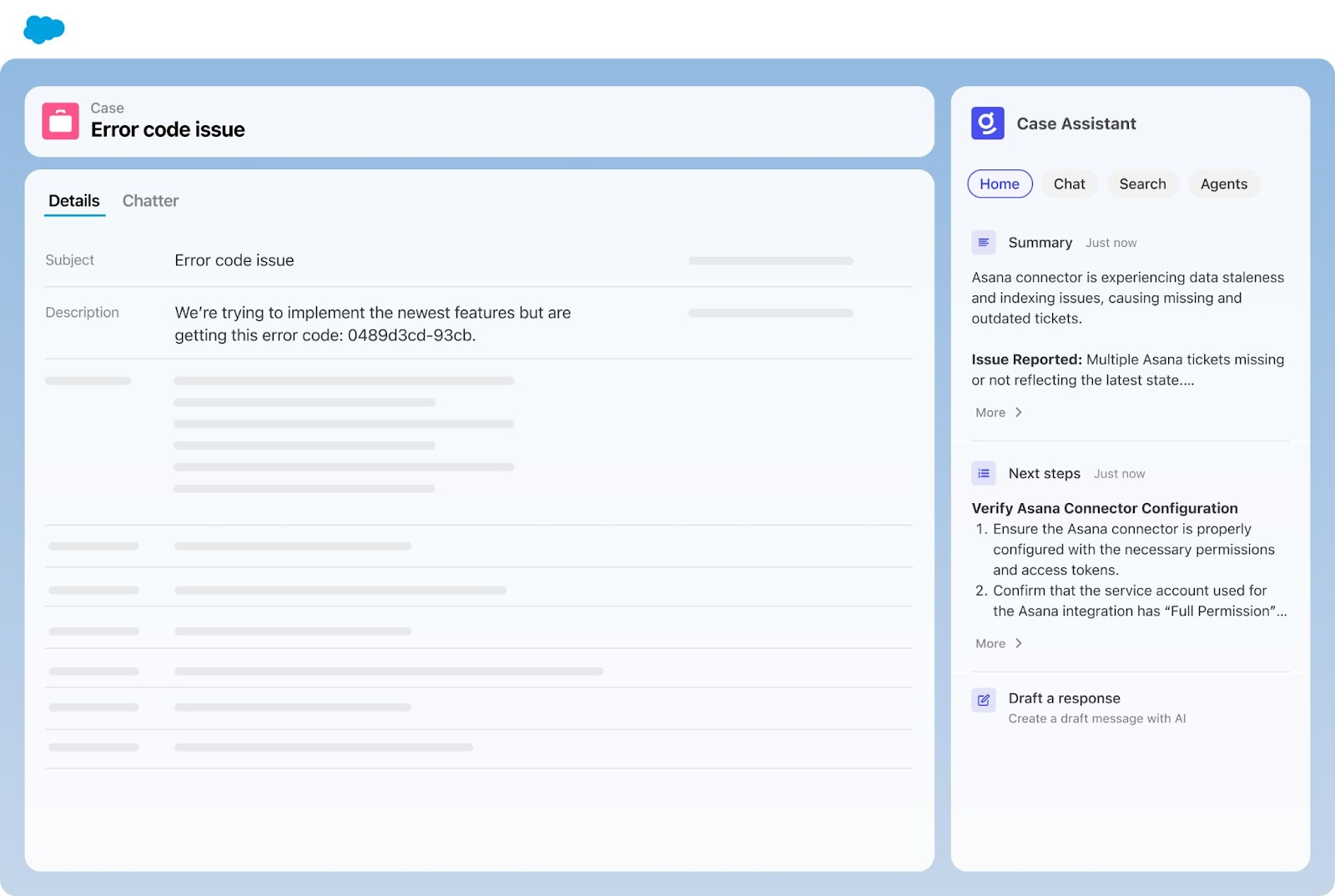
With these tools, customer service teams see fewer escalations, faster resolutions, higher customer satisfaction, and significantly reduced ramp time for new agents. Teams can keep pace with rising expectations and hold the line on critical SLAs, even as workloads increase.
New features that service teams want—and need
We love seeing our customers succeed with our embedded integrations. One global finance automation customer saw a 98% decrease in time to assign tickets and a 67% decrease in average resolution time after incorporating Glean in Zendesk.
Because adoption of AI in customer service has accelerated, feedback from working teams like theirs has shaped important updates to Glean’s integrations across Zendesk, ServiceNow, and Service Cloud. Here’s what’s new:
1. A home for every agent
One common request from Glean admins was improved flexibility to curate the tools used by their teams for work. We’ve made this possible by changing the old “Overview” tab to a more customizable “Home” tab, housing quick access to AI agents that support the most common team workflows. This update lets admins pin and prioritize the most essential tools for their agents.
2. Chat and Search, side by side
Two new tabs—Chat and Search—replace the previous “Resources” tab.
- Chat brings Glean Assistant front and center, making it effortless for agents to ask questions about a ticket or workflow in natural language, right inside their ticketing platform. This has proven invaluable for new hires, acting as a real-time AI assistant to help them troubleshoot or learn the ropes on day one—right from where they’re working and already learning.
- Search now provides full, company-wide search directly in the side panel. Now, agents can seek out relevant tickets, docs, knowledge base articles, and even conversations happening in channels like Slack, without leaving the workspace. Glean summarizes all search results, so agents get the crucial information they need at a glance without needing to drill into each source. That lets them focus on the ticket, not on a wild chase for details.
Since not every answer is captured in formal documentation, giving your agents access to knowledge across the company through these new features can dramatically speed up resolution times. With Glean, an agent responding to a ServiceNow incident could instantly pull in the context of related Jira tickets, chat threads, or technical docs—even if those live outside of ServiceNow.
3. Deeper personalization for Admins
Admins now have granular control over which AI agents appear in the sidebar and where. This enables them to display what’s most important and impactful for support teams to have under their belt.
- Pin the most-used agents to the Home tab for maximum visibility
- Add specialized agents (like one for creating knowledge base articles from resolved tickets) to the Agents tab
- Hide unnecessary agents to reduce clutter
- Tailor which features the team can access, adjusting the experience as teams grow or evolve
Configurable AI Agents that map to real-world workflows
Glean provides complete flexibility and customizability when it comes to building Agents. Here are a few scenarios that customer service leaders have found the most impactful:
- Summary: Produces a ticket or case summary and timeline, supporting efficient handovers or rapid troubleshooting.
- Next steps: Recommends actions for resolution, using both ticket context and company knowledge.
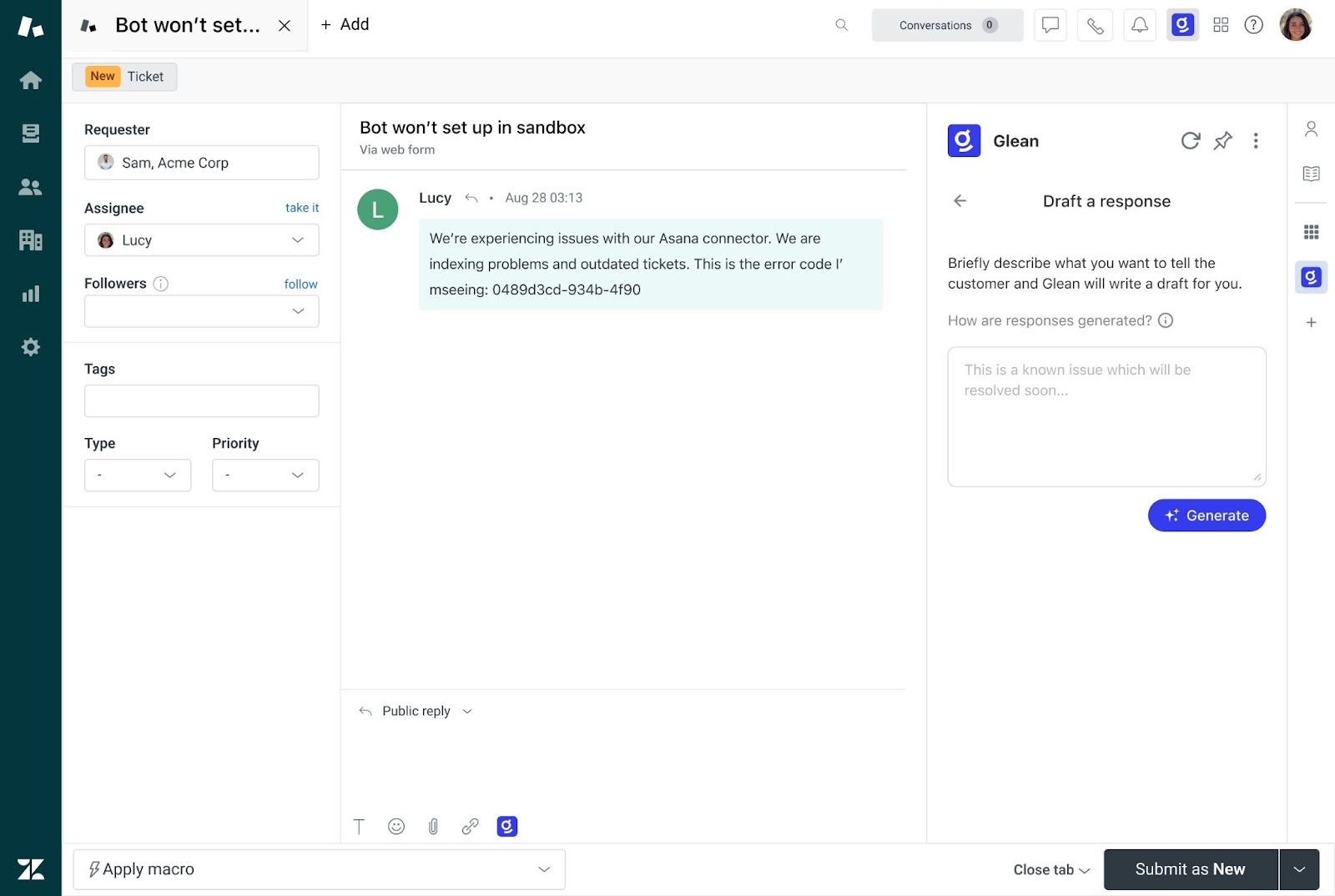
- Draft a response: Instantly creates a personalized draft for customer communication, ready for an agent’s review and send.
- Create a KB article from a ticket: Checks if a resolved issue is already covered and, if not, builds a new article—lowering repeat tickets and improving the knowledge base over time.
AI where you work, when you need it
Every customer service leader faces increasing pressure to do more with less. But the path to best-in-class support isn’t about chasing technology for its own sake—it’s embedding the right intelligence, right where teams already operate, to help agents resolve tickets more confidently, accurately, and quickly. When AI is woven into the everyday workflow, service teams can focus on the customer, not the chaos behind the scenes.
If you’re ready to see how embedded AI can support your agents—whether in Zendesk, ServiceNow, or Service Cloud—visit any of our solutions pages below for details:
Curious to learn more about Glean and how to get started with a complete work AI platform for customer support? Sign up for a free demo today!

