






Who this is for
Staff and principal engineers, platform and developer productivity teams, and engineering leaders who are being asked a simple question with a non‑simple answer:
“What is our AI strategy for software engineering, and which tools actually belong in that stack?”
This guide is meant to be a lay of the land for AI in software development. It surveys the major categories of tools, the patterns that are emerging in real teams, and the architectural choices that separate short term experiments from durable foundations. It also explains where platforms like Glean fit in that broader picture.
1. Where software engineering is today
Software engineering teams are under pressure to:
- Ship features faster in competitive markets
- Keep systems reliable and secure as architectures grow more complex
- Do more with constrained headcount and hiring pipelines
The underlying shift is largely from the "must have an AI strategy" push. There's a competitive angle because others are doing it and working faster. The general sentiment is to not fall behind.
At the same time, the way engineers work is changing:
- Generative AI and large language models are now part of daily workflows, from code completion to documentation and testing.
- Developers report meaningful productivity gains with AI tools such as GitHub Copilot and similar assistants.
- AI is speeding up individual tasks, but engineering work still depends on pulling together context across tools, systems, and teams.
- Expect AI platforms to be open and composable: engineers want a context layer and governance foundation, but the freedom to plug in different coding assistants, models, and workflows as needs change.
Most organizations are now somewhere between experimentation and consolidation:
- Some teams have rolled out AI coding assistants widely in the IDE.
- …but leaders interviewed in the AI Transformation 100 estimate that around 80% of early AI initiatives fail to reach the productivity gains they imagined, and a 2025 BCG study found a median ROI of just 10% vs. 20%+ targets, so many of these deployments are still treated as experiments rather than core infrastructure.
- Others limit usage due to security or IP concerns.
- Only 36% of organizations had any AI policy in place, while 45% of workers admitted using AI tools their employers had banned, which makes governance feel fragile and pushes some leaders to clamp down.
- Many are trying to understand how AI should interact with existing systems like GitHub, Jira, observability tools, and wikis.
- AI Transformation 100 points to IDC research that roughly 90% of enterprise data is unstructured (emails, PDFs, call transcripts, wikis, chats, support tickets, CRM notes)
This is the backdrop for evaluating AI tooling for engineering: teams want real gains, not just pilots, without losing control of their systems or data.
2. The emerging AI tooling landscape for engineers
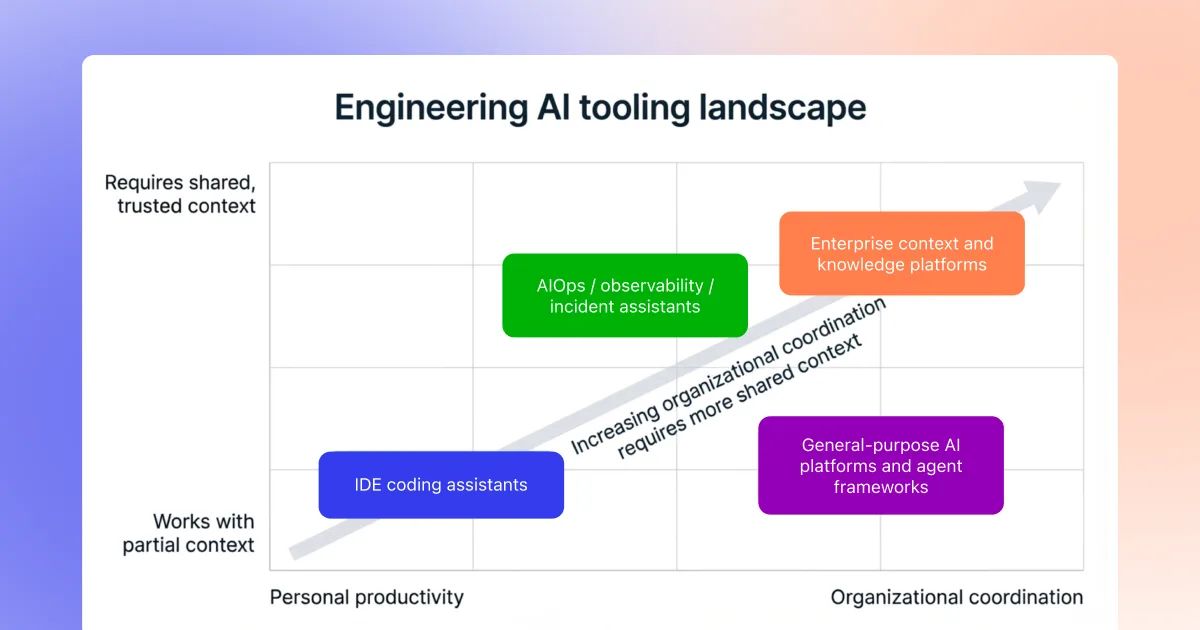
The AI stack for software development is no longer a single product choice. It is a portfolio of tools that tend to fall into a few categories.
2.1 Coding assistants in the IDE
Examples: Cursor, Claude Code, GitHub Copilot, Windsurf, Codeium, Sourcegraph Cody, and others.
What they do well
- Inline code completion, refactors, and test generation in the editor
- Rapid scaffolding of new endpoints or modules
- Localized debugging inside a single workspace or repository
Typical blind spots
- Limited visibility into tickets, incidents, or design rationale
- Lack of a unified view across multiple repos, services, and tools
- Varying security and governance models that require careful configuration
In practice, many teams are treating coding assistants as personal power tools for individual developers, rather than as the backbone of an organizational AI strategy.
2.2 Enterprise context and knowledge platforms
A second category focuses on connecting the artifacts and people behind the code, rather than on editing the code itself. A system that understands the engineering organization in its entirely, not just individual files, is critical for shaping AI outputs into results usable in the enterprise.
These platforms:
- Unify code, tickets, logs, docs, designs, incidents, and discussions into a single, permission aware context layer.
- Help teams trace from an alert or question through to owners, prior work, and past incidents.
- Provide search, Q&A, and sometimes agents that operate over this broader graph.
2.3 AIOps, observability, and incident assistants
Tools in this category usually live inside monitoring and incident response platforms.
Common capabilities include:
- Summarizing alerts, traces, and logs
- Highlighting likely regressions or components involved in an incident
- Providing canned runbook steps for specific patterns
These tools can be powerful within their substrate, but they often have a narrow scope: they do not know about Jira workflows, code ownership conventions, or the design decisions captured in separate systems.
2.4 General purpose AI platforms and agent frameworks
This includes:
- Hosted LLMs
- Agent building frameworks and orchestration tools
- Low code AI builders integrated into cloud or SaaS platforms
They make it easier to prototype assistants or agents, but by themselves they do not provide an enterprise engineering graph. They rely on whatever data and structure the organization wires in.
3. The two layer model: context vs coding surfaces
Across these categories, a simple architecture pattern is emerging.
Layer 1: Enterprise context and knowledge
This layer answers questions like:
- How do our services relate across teams and repos?
- Which incidents, tickets, and design docs are tied to this change?
- Who owns this feature or system, and what constraints were agreed on?
It typically includes:
- Connectors to GitHub or other Git hosts, Jira, incident tools, observability platforms, wikis, document stores, chat systems, and more
- Hybrid lexical and semantic indexes for code and documents
- An enterprise graph linking services, APIs, incidents, tickets, owners, and design artifacts
Layer 2: Coding and interaction surfaces
This is where engineers actually work:
- IDEs and AI forward coding environments such as Cursor and Claude Code
- GitHub and other code hosts
- Jira and work tracking tools
- Slack, Microsoft Teams, and other collaboration tools
Most organizations that are moving beyond pilots are converging on a two layer model:
- A context layer that understands the organization and keeps data within its security and governance boundaries.
- Multiple coding and interaction surfaces that tap into that context rather than each reinventing it.
Glean is designed explicitly for the context layer, and then exposes that context into the tools engineers already rely on via search, Assistant, agents, and protocols like MCP.
4. How teams are actually using AI in the SDLC
Rather than thinking in terms of features, it is useful to look at how AI is showing up in real software development workflows.
4.1 Onboarding and service understanding
The situation
- New hires join, engineers rotate between projects, and ownership changes over time.
- Important knowledge is spread across old design docs, Jira tickets, PRs, incidents, and Slack threads.
How teams are using AI
- Asking assistants to explain unfamiliar code paths or components.
- Using search and Q&A over internal docs and tickets to find relevant background.
- Applying agents that can generate onboarding summaries for a service or project.
Where the context layer exists, those workflows become more reliable:
- A query like “Give me an overview of the payments service and link key design docs” can resolve through code, tickets, incidents, and ownership rather than just code comments.
GitLab found that 43% of teams already using AI for software development said developer onboarding typically takes less than a month, versus 20% of teams not using AI.
4.2 Day to day coding and small changes
The situation
- Engineers spend much of their time on small, incremental changes: config updates, simple bug fixes, and iterative refactors.
- IDE coding assistants are strong at speeding up this work, but can miss organizational constraints.
How teams are using AI
- Inline completion and refactors from tools like Cursor or Copilot.
- Generating tests and documentation updates alongside changes.
- Combining code search, Code Writer style agents, and existing coding assistants to propose scoped changes from tickets or Slack threads.
Teams that want production ready usage are starting to:
- Define clear change classes where AI is allowed to propose edits.
- Use comments, design docs, and linked tickets as guardrails, so AI suggestions reflect real constraints rather than generic patterns.
4.3 Incidents and production support
The situation
- On call engineers juggle alerts, dashboards, logs, and Slack threads while trying to identify root cause and owners.
- Context switching is high, and historical incident knowledge is hard to reuse.
How teams are using AI
- Summarizing alerts and logs in context.
- Pulling together related tickets, code changes, and past incidents into a single view.
- Drafting postmortems and customer facing communications based on real timelines and artifacts.
Here the boundary between categories becomes clear:
- Observability tools supply metrics and traces.
- Coding assistants help propose code level fixes.
- A context platform such as Glean ties it all together across systems and produces a coherent narrative.
5. Key questions to ask when evaluating AI tooling
From conversations with engineering leaders and the broader market, a few evaluation questions keep coming up.
5.1 Coverage: what does the tool actually see?
- Does it only see code in the current workspace, or can it see relevant tickets, incidents, and design docs?
- Can it trace from an alert in Slack to code, to owners, to past incidents?
- How does it handle monorepos, polyglot stacks, and multiple code hosts?
5.2 Trust and accuracy
- Does the tool ground its answers in your own code, tickets, and logs, and can it show its work?
- Are outputs explainable and cited, or do they require manual verification each time?
- How are failure modes handled, especially in incident and change workflows?
5.3 Security and governance
- Where are semantic and lexical indexes for code and documents hosted?
- Do code and logs stay inside your own VPC, and are there strict egress controls for agents and code generation?
- Are there clear audit logs for queries and actions, especially for code writer workflows?
5.4 Fit with existing workflows
- Does the tool integrate with GitHub, Jira, observability, and chat, or does it require a separate interface?
- Can it work alongside existing IDE copilots via protocols like MCP, or does it try to replace them?
- What is the rollout path from a single team to multiple teams without a big bang cutover?
These questions apply regardless of whether the tool in front of you is a coding assistant, an observability add on, or an enterprise context platform.
6. Where Glean fits in this landscape
Within this broader “state of the nation” for AI in software engineering, Glean sits in the context and platform layer of the stack, not in the IDE surface. Its role maps to three themes.
6.1 Deep enterprise context
- Connects code, tickets, logs, docs, designs, incidents, and discussions into a single source of truth for engineering work.
- Gives teams one place to answer questions like “what changed, where, and who owns it?” without stitching together multiple tools.
- Lets assistants and agents follow real references and ownership across systems instead of guessing from a single repo or workspace.
6.2 Open, horizontal platform
- Provides a model agnostic platform that can serve multiple departments, not just software engineering.
- Indexes data once and exposes it everywhere through APIs and MCP compatible tooling, so you do not have to rebuild plumbing for each team or assistant.
- Powers agents that span engineering, support, sales, ops, and other functions while sharing the same governed enterprise context.
6.3 Built for enterprise security, governance, and scale
- Offers single tenant or in VPC deployment so code, logs, and data stay inside your environment.
- Enforces source system ACLs end to end in search, Assistant, and every agent, with auditable logs for queries and actions.
- Scales with your estate of connectors, services, and agents without fragmenting permissions or duplicating indexes.
6.4 Better together with coding assistants
Glean is not a coding assistant like Cursor or Copilot. It is designed to work alongside them:
- Coding assistants remain focused on local code editing and completion inside the IDE.
- Glean provides the governed, organization wide context layer and exposes it through search, Assistant, agents, and an MCP server that coding assistants can call from the editor.
Common “better together” patterns include:
- Using Cursor or Claude Code in the editor while calling Glean via MCP for deep code search, ticket and incident context, and ownership.
- Having Glean agents turn Jira bugs or Slack threads into scoped implementation PRs, which developers then refine with their preferred coding assistant.
In this sense, Glean is part of the AI landscape rather than the entire landscape: it gives engineering teams a stable context and security foundation that multiple assistants and agents can build on.
7. Putting it all together
As AI becomes standard in software engineering, a few patterns are solidifying:
- AI is moving from experimentation to infrastructure. Teams that standardize on a context layer and clear workflows will adapt more quickly than those running isolated pilots in individual tools.
- The most successful stacks blend tools rather than bet on a single product. Coding assistants, observability AI, and enterprise context platforms each play distinct roles.
- Security, governance, and explainability are becoming table stakes. Running AI systems in your own environment, grounding outputs in your own artifacts, and preserving existing permissions will matter as much as model quality.
For engineering leaders, the key is to design an AI stack that:
- Respects how engineers actually work today
- Reduces context chasing instead of adding more surfaces
- Leaves room for different coding assistants while consolidating organizational knowledge in one trusted layer
Glean is one way to implement that context layer for software engineering teams, alongside the many other tools in the evolving AI ecosystem.
