








It's Monday morning, and the pipeline dashboard shows a dip. The chart tells you what happened, but the why is spread across a dozen places: account history in Salesforce, a heated Slack thread, a few support tickets, and a metric definition someone documented two reorgs ago. So, you send a request to the data team and wait for answers. It’s a familiar scenario for many.
Fortunately, enterprise analytics has changed drastically in the past five years. We went from dashboards to AI assistants, and now to agentic workflows that can investigate a question and help draft the next step. Although dashboards aren't going anywhere, the questions that drive real decisions are almost always follow-ups: Why did this move? What's behind it? What should we do now? The answers to these questions are often scattered across enterprise systems, and sometimes, in the operator’s head.
AI has gotten us closer to this dream, but every tool seems to solve only part of the problem. General-purpose assistants can answer a question, but they may not know enterprise-specific data — like which version of "revenue" your finance team actually uses. Warehouse-native agents know your governed data well, but they miss everything that lives outside the warehouse. BI copilots can explain a chart, but someone still has to turn that insight into a plan, a deck, or a decision.
The missing ingredient is holistic enterprise context that connects the what and the why across different types of data and enterprise systems. Without a permission-aware layer that connects data with the business around it, every employee ends up playing detective. Today, we're introducing Glean for Data Analysis to bridge context with the what and why — bringing company data and business context together so employees can explore questions in natural language, build interactive data applications and agents, and complete high-quality work in one workspace.
A Context layer that brings data insights to any AI front door
Here's the good news: Glean for Data Analysis doesn’t require you to rebuild anything. Organizations have spent years building data infrastructure, and Glean for Data Analysis is designed to make that investment work harder.
Customers can connect Glean to enterprise applications like Salesforce and Jira, BI tools like Power BI and Tableau, data warehouses like Snowflake and Databricks, and the semantic models and data catalogs that keep everyone's definitions consistent. Glean's Enterprise Graph then pairs that governed, structured data with the unstructured context found in documents, conversations, tickets, and more. This makes Glean a context layer that brings data insights to any AI front door and interface.
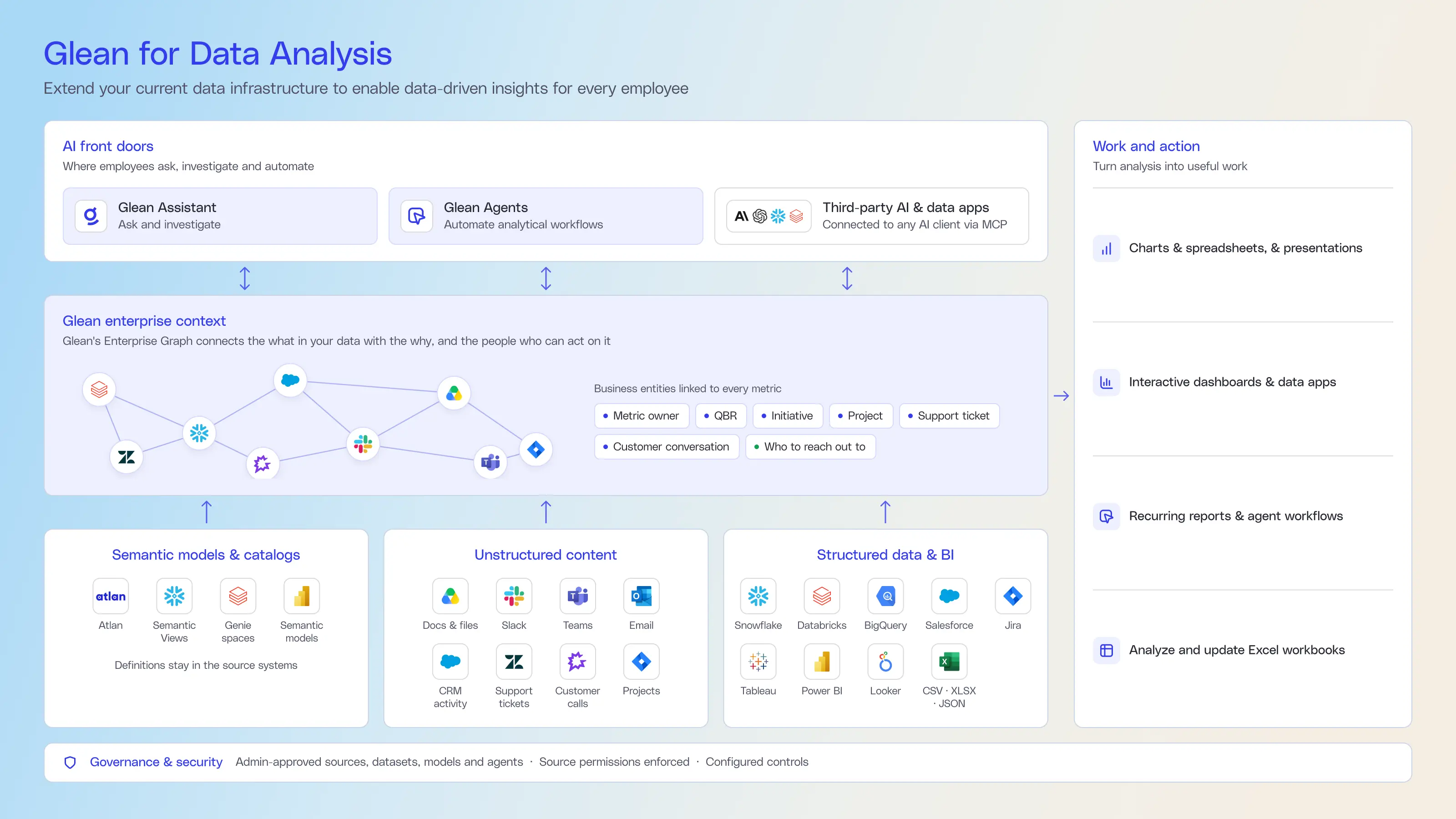
Now, every employee can ask questions, chase down trends, automate analytical workflows, and build interactive dashboards without sending a ticket to the data team. Data teams continue to manage the systems, definitions, and governance controls they rely on, while providing a unified analytics front door for the entire organization. Everyone moves from data to decisions faster, with the data infrastructure you already built and trust.
Unlocking insights across every team
With this foundation in place, Glean for Data Analysis supports a myriad of analytical workflows across departments and industries.
- Conversational analytics: Employees can ask about revenue, pipeline, customer behavior, product usage, operational performance, or workforce trends.
- Build interactive data dashboards and apps: Turn questions and analysis into interactive dashboards, charts, and useful data applications that help teams explore performance and make decisions in the flow of work.
- Build recurring reports with agents: Convert one-time analysis into recurring reports, decision briefs, and agent workflows.
- Bring Glean’s context to your data apps: Through partnerships with Snowflake and Databricks, organizations can extend Glean’s permission-aware enterprise context into the data and AI applications employees already use. This connects governed data with the documents, conversations, and business knowledge that explain what the numbers mean and what to do next.
“When we want to understand shipment-lane performance, we can ask Glean to identify which lanes have had the biggest margin changes over a given time period, using data from Snowflake and Sigma. That gives our team a more flexible way to investigate the operational questions behind the numbers.” – David Keitel, Engineering at Frock Freight
“What’s powerful is that a Glean agent can give you a complete picture of a specific deal by pulling together context from Slack, Drive, and other systems — what happened last week, what the blockers are, and what should happen next. And because it can then prompt action in Salesforce, it doesn’t just surface insight; it helps make that data more useful for everyone.” -Sumeet Marwaha, Head of Data, Brex
“Our Sales Pipeline Analyzer agent analyzes API pipeline data from Snowflake using natural language queries. It automatically formats results as pivot tables or lists, provides key insights about pipeline performance by source and time period, and suggests follow-up questions for deeper analysis.” – Gavin Denyse, Vonage Business Inc
“One of the most valuable agent patterns has been a Salesforce- or Jira-based agent for recurring analysis and reporting. It turns a repetitive, multi-step workflow into something consistent and repeatable, uses the right structured queries for better accuracy, and reduces the manual effort required to get meaningful results.” – Justin Giardina, 11:11 Systems
“Being able to synthesize weekly work information for executive updates has been invaluable - the ability to crunch vast amounts of corporate data to generate an executive summary. The embedded SOQL Salesforce query agent is priceless as well.” – Udai Tennati, Manhattan Associates
Why choose Glean for Data Analysis
Working with data shouldn’t require every employee to think like a data engineer or wait for another team to get back to them. Glean builds on your organization’s existing data infrastructure and adds the business context and work surfaces employees need to understand the numbers and act on them. With Glean as the front door to data across systems and semantic definitions, data teams can confidently roll out accurate, governed analytics to the whole organization, and maybe finally get a break from "quick question" requests.
Ready to see it in action? Join our webinar, Enabling AI Analytics with Full Enterprise Context to learn how to bring governed analytics to every employee.
Glean for Data Analysis connector availability
- Generally available in Glean Assistant and Glean Agents: Salesforce, Jira, file analysis for CSV/XLSX/JSON, Snowflake, Databricks, Big Query, Sigma, and Power BI
- Beta in Glean Assistant: Tableau, and Looker
- Beta in Glean Agents: Tableau, and Looker
- Glean MCP: Glean's Data Analytics Context is accessible via MCP to any agentic clients in the enterprise.
