








An enterprise AI copilot is a platform that connects to your company's internal systems — documents, conversations, tickets, CRM records, and code repos and delivers cited, permission-aware answers through a conversational interface.
Deploying one well means combining permission-aware data integration, a mix of AI assistants and governed AI agents, a phased rollout starting with 50–100 pilot users, and governance controls (RBAC, audit trails, SOC 2/HIPAA/GDPR) built in from day one.
Here's why that matters right now: your employees spend one full workday every week just searching for information.
Not doing work. Searching for the stuff they need to do the work. That's the problem an enterprise AI copilot solves and the reason the market crossed a double-digit-billion-dollar run rate in 2025.
At Confluent, support engineers used to burn 5–10 minutes per ticket just finding the right context. After deploying a copilot, it dropped to near zero. Not because they searched faster. Because they stopped searching.
If you're past the "should we?" conversation and into the "how do we do this right?" conversation, this playbook is for you. It covers what an AI copilot for business actually is, how to wire it into your data securely, which deployment model fits, and how to measure whether the thing is working.
At a glance:
- What an enterprise AI copilot is — and how it differs from chatbots and general-purpose AI
- The real difference between AI assistants, AI agents, and agentic AI
- How to integrate your business data securely using RAG
- Deployment models with honest tradeoffs
- Department use cases: sales, support, engineering, HR
- A phased rollout roadmap with measurable KPIs
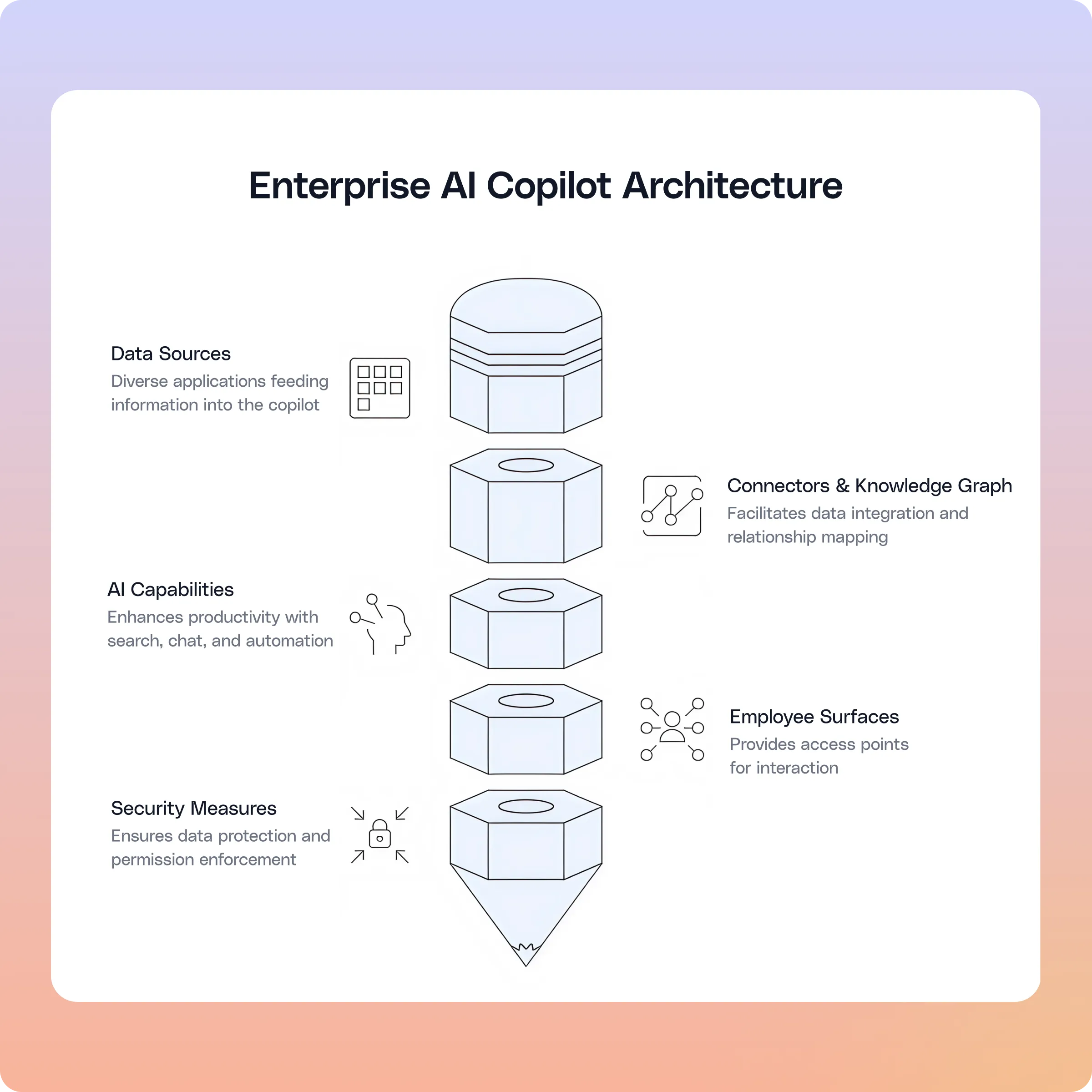
What is an enterprise AI copilot?
An enterprise AI copilot connects to your company's internal knowledge. It pulls from your documents, conversations, tickets, CRM records, and code repos. Then it delivers cited, permission-aware answers through a conversational interface.
Three words matter here.
"Internal knowledge" means the copilot indexes your actual data. Not the public internet. Your Confluence pages, your Slack threads, your Jira tickets, your SharePoint docs. In other words, the stuff your employees spend 20% of their week hunting for.
Permission-aware" means every answer respects your source system's access controls. If you can't see a document in Google Drive, the copilot won't show it to you either. Period. Glean enforces this in real time through its Enterprise Graph, which continuously syncs source-system permissions rather than relying on nightly batch indexing.
"Cited" means every response links back to its source. So your employees can verify before they act. No black-box answers.
How does an enterprise AI copilot differ from a chatbot?
Chatbots follow scripts. They're fine for "What are your store hours?" But they fall apart the moment someone asks anything outside the decision tree.
An enterprise AI copilot handles messy, real-world questions. For example: "What did we decide about the EMEA pricing change in last week's Slack thread?" That's not a chatbot question. That's a copilot question.
Here's the simplest way to think about it. A chatbot is a phone tree. A copilot is a knowledgeable colleague.
How does an enterprise AI copilot differ from a general-purpose AI assistant?
General-purpose AI assistants like consumer ChatGPT are strong at brainstorming, drafting emails, and analyzing data. But they have a blind spot — they don't know your company. They don't know your pricing guidance or your internal approval process.
An enterprise AI copilot fixes that. It layers general AI capabilities on top of deep, permission-aware access to your internal knowledge.
As a result, you get answers that are specific to your organization and safe to act on. Glean's approach — connecting 100+ enterprise apps into a single Enterprise Graph — is how that organizational context gets built.
What can an enterprise AI copilot actually do?
Your copilot delivers value in three areas:
- Search and retrieval. You search across your connected tools from a single query and get cited answers — not a list of blue links.
- Content creation and summarization. Your teams draft memos, generate meeting summaries, and analyze data from multiple sources. Every output links back to the originals.
- Workflow automation. AI agents handle repeatable tasks — ticket routing, CRM updates, compliance checks — with governance built in.
But before you evaluate platforms, you need to understand three terms that trip up most buying committees.
AI assistants, AI agents, and agentic AI — what's the difference?
Vendors throw these terms around interchangeably. But each describes a different capability. Understanding the distinction helps you architect your deployment correctly.
AI assistants
An AI assistant waits for you to ask. You type a question. It retrieves or generates an answer grounded in your company's data. It's reactive by nature.
Think of it as the colleague who reads every document and attends every meeting. When you need a cited summary, they deliver it fast. Assistants work best for research, content creation, data analysis, and ad hoc questions.
AI agents
Agents work best for repeatable, rule-based, high-volume workflows. Glean's Agent Builder lets non-technical teams in support, sales, and HR build exactly these agents without writing code each inheriting the platform's permission-aware, cited, and governed behavior.
Agentic AI
Agentic AI is the orchestration and governance capability layer that sits underneath enterprise AI agents — enabling multi-step planning and enforced approvals. It includes the engine that plans tasks across multiple systems. It also includes the governance framework that enforces approvals and audit trails.
In practice, agentic AI moves your enterprise from "ask and receive" to "define a goal and let AI execute it" — with controls to keep it safe.
AI assistants vs. AI agents: which one should you use?
Here's a useful shortcut. If you'd explain the task to a new hire in a conversation, use an assistant. If you'd hand them an SOP and a checklist, build an agent.
And if the workflow needs both? Combine them.
Here's what that looks like. A sales rep asks the assistant for a deal brief. The assistant generates it. Then an agent logs the summary in the CRM and schedules a follow-up.
That handoff from understanding to action is where your productivity gains compound. This is also where enterprise AI agents start earning their keep alongside your assistant.
What should a conversational interface actually do?
"Conversational interface" sounds like chatbot with extra steps. It's not. When done well, it lets your employees talk to the company's knowledge base like they'd ask a colleague. No query syntax. No remembering which tool holds what.
Three things separate good from mediocre:
- Cited responses, every time. Every answer includes clickable links back to the source. If you ask "What's our refund policy for EMEA?" the copilot returns the specific policy, cites the doc, and lets you follow up with "Who approved the latest update?"
- Answer-first structure. Lead with the conclusion. Then show supporting context below it. Your employees don't want to watch the copilot "think" — they want the answer first, then the receipts.
- Follow-up prompts that guide exploration. The interface suggests next questions so you can dig deeper. This is especially valuable for new hires and employees working outside their core domain.
How do you integrate business data securely?
Your enterprise AI copilot is only as useful as the data it can reach.
But here's the thing — reach without governance is a liability. Especially in regulated industries.
Start by mapping your critical data sources
First, inventory the systems your employees query most. These typically include document repos (Google Drive, SharePoint, Confluence), messaging tools (Slack, Teams), CRM platforms (Salesforce, HubSpot), ticketing systems (Jira, Zendesk, ServiceNow), and code repos (GitHub, GitLab).
You don't need to connect everything on day one. Instead, pick the five to ten data sources that save the most time. For most companies, that's the doc store, the messaging tool, and the ticketing system. Glean ships native connectors for all of the above, which is why customers typically get the first five live in weeks rather than months.
Why permission-aware data access is non-negotiable
Every result the copilot returns must respect your source system's access controls. If your employee can't see a confidential HR doc in Google Drive, the copilot shouldn't show it either.
Importantly, this needs to happen in real time. Not through a nightly batch sync. Real-time permission-aware indexing is what separates an enterprise-grade copilot from a general-purpose AI tool plugged into your data.
How RAG keeps your enterprise AI copilot answers grounded
Retrieval-augmented generation (RAG) is the architecture behind accurate copilot answers. Instead of relying on a model's general knowledge, RAG retrieves your internal documents at query time. Then it uses those documents to generate a cited answer.
Here's how the process works. First, connectors pull data from your source systems. Next, the platform indexes and chunks the content. Then, a knowledge graph maps relationships between people, documents, and topics.
When you ask a question, the retrieval layer finds the most relevant content. Finally, the LLM generates a response anchored to those sources with citations you can click.
No hallucination. No guessing. Just grounded answers with receipts. Glean's knowledge graph and retrieval layer are purpose-built for enterprise RAG — mapping relationships between people, documents, and topics across 100+ connected apps so every generated answer stays anchored to your source systems.
What about data residency for enterprise AI copilots?
If you operate in a regulated industry, data residency isn't optional. Evaluate whether your vendor supports regional hosting (US, EU, APAC), in-region processing, and tenant-level isolation. Get this confirmed in writing before you sign anything.
Search, summarization, and workflow automation: where the enterprise AI copilot ROI actually lives
An AI copilot for business delivers three capabilities. Each works differently. Each delivers a different kind of return.
Enterprise search
This is where you'll see the fastest ROI. Legacy search returns a list of links. Your copilot returns the answer — cited, in seconds. It understands natural language and factors in who's asking and what they've been working on.
If your employees lose hours each week to searching, this alone justifies the deployment. One telecom firm in Forrester's Total Economic Impact study on Glean estimated $8 million in annual savings from their call center alone. Just from faster access to release notes and customer information.
Summarization
Summarization turns hours of reading into minutes. Your copilot can compress long documents, email threads, Slack conversations, and meeting transcripts on demand. It pulls out key points, decisions, and action items — all linked back to the originals.
Here are the use cases that come up most:
- Meeting prep. A briefing on all recent activity for an account, compiled in seconds instead of 30 minutes of manual work.
- Onboarding. At Super.com, new hires ramped 20% faster by using search and the org chart to learn team structures from day one. That kind of impact compounds across every new hire you bring on.
- Decision support. All your internal research on a topic, compiled before a planning session. No more "I think someone wrote a doc about this."
Workflow automation via enterprise AI agents
Enterprise AI agents extend your copilot beyond Q&A into action. They route tickets. They log CRM updates. They generate reports. They schedule follow-ups.
But here's the catch: automation without governance creates trouble. Your goal isn't unsupervised autonomy. Instead, you want governed, auditable agents that save time while keeping humans accountable. Approval checkpoints, audit trails, and role-based access controls aren't optional — they're the whole point.
Micro-actions inside the conversation
The best enterprise AI copilots let employees act directly from the conversational interface — creating tickets, updating records, sharing summaries, and triggering workflows without switching apps. These micro-actions close the gap between insight and action.
What deployment model fits your enterprise AI copilot?
No single model works for everyone. Your best choice depends on your regulatory environment, your IT capacity, and how fast you need to move.
<div class="overflow-scroll" role="region" aria-label="Deployment models, best use cases, time to value, and tradeoffs">
<table class="rich-text-table_component">
<thead class="rich-text-table_head">
<tr class="rich-text-table_row">
<th class="rich-text-table_header" scope="col">Model</th>
<th class="rich-text-table_header" scope="col">Best For</th>
<th class="rich-text-table_header" scope="col">Time to Value</th>
<th class="rich-text-table_header" scope="col">Tradeoff</th>
</tr>
</thead>
<tbody class="rich-text-table_body">
<tr class="rich-text-table_row">
<td class="rich-text-table_cell">Cloud (SaaS)</td>
<td class="rich-text-table_cell">Most mid-market and enterprise deployments</td>
<td class="rich-text-table_cell">Weeks (TIME magazine went live in 3)</td>
<td class="rich-text-table_cell">Less infrastructure control; vendor uptime dependency</td>
</tr>
<tr class="rich-text-table_row">
<td class="rich-text-table_cell">Hybrid</td>
<td class="rich-text-table_cell">Regulated industries with data boundaries</td>
<td class="rich-text-table_cell">2–4 months</td>
<td class="rich-text-table_cell">Complex architecture; higher setup cost; dual-layer management</td>
</tr>
<tr class="rich-text-table_row">
<td class="rich-text-table_cell">On-premise</td>
<td class="rich-text-table_cell">Government, defense, highly regulated sectors</td>
<td class="rich-text-table_cell">4–6+ months</td>
<td class="rich-text-table_cell">Significant internal resources; GPU capacity; slower model upgrades; higher TCO</td>
</tr>
</tbody>
</table>
</div>
Cloud (SaaS)
This gives you the fastest time to value. The vendor hosts, manages, and updates everything. Sharon Milz, CIO at TIME magazine, put it bluntly: they were up and running in three weeks. That speed only happens with the cloud.
Hybrid
With hybrid, your sensitive data stays on-premises. Meanwhile, compute and inference run in the cloud. This model works well in regulated industries where certain datasets can't leave your boundaries.
On-premise
This gives you full control over infrastructure, data, and model hosting. For government, defense, and highly regulated sectors, it's sometimes the only viable path.
Three enterprise AI copilot governance non-negotiables
Regardless of which model you choose, three things must be baked in from day one:
- RBAC. Define who can access which data, create agents, and view results — scoped by role and department.
- Audit trails. Log every query, response, and agent action.
- Compliance controls. Support SOC 2, HIPAA, GDPR, and FedRAMP natively — not patched on after launch.
These aren't blockers. They're what make your enterprise-wide rollout defensible.
How do you get people to use your enterprise AI copilot?
Deploying is a technology project. Adoption is a people project. If you treat it as both, you reach value faster. If you don't, you end up with expensive shelfware.
Map your stakeholders
Executives care about ROI and risk. Department champions care about workflow wins. End users care about one thing: does this save me time? Build your rollout plan around all three groups.
Lead with outcomes, not features
"Reduce ticket resolution time by 30%" lands with your team. A feature list doesn't. So ask each department: what's the most time-consuming task you do every week? Then show how the copilot addresses it.
Run a focused pilot
Start with one or two departments. Define your use cases. Set clear metrics. Here are typical pilot KPIs:
- Time saved per employee per week
- Internal support ticket deflection rate
- Weekly active users
- Employee satisfaction (survey-based)
Give it 60–90 days. At Zillow, the team ran "AI Days" — virtual sessions where employees built agents in small pods. They hit 80% adoption across the organization. At GCash, word-of-mouth alone drove 90%+ adoption in some departments. Employees saw colleagues saving 2–3 hours per week and wanted in.
One head of digital workplace told Forrester: "We had 80% adoption within 90 days." At that same organization, the response was so strong that Glean became a retention tool. Their exact words: "We can't take it away. Our folks wouldn't go work for a company without it."
Train for the workflow, not the tool
Keep sessions short — fifteen minutes, role-specific. Cover how to ask good questions, how to verify citations, how to trigger agents, and when to escalate. That's it. Short sessions beat hour-long webinars every time.
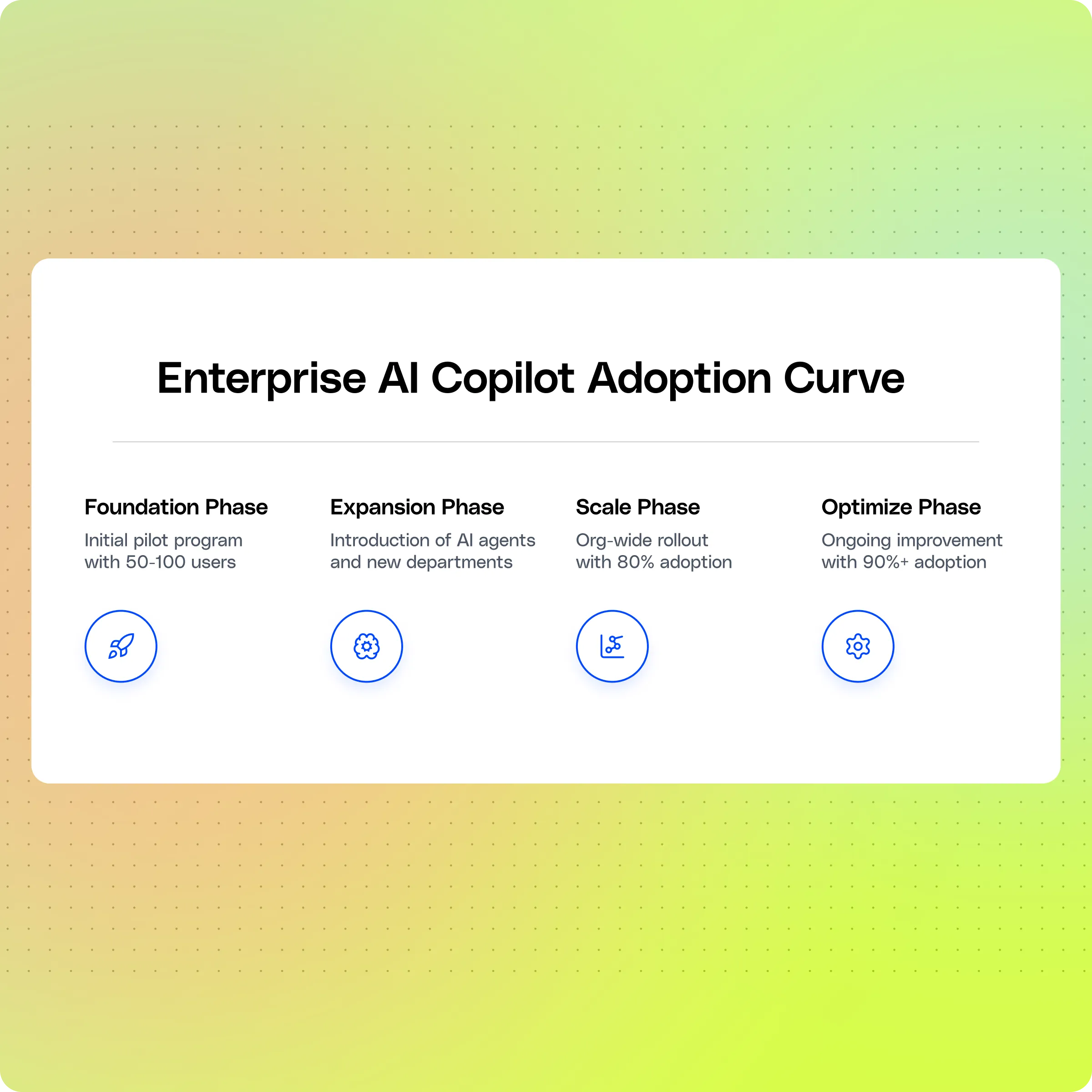
Enterprise AI copilot implementation roadmap
A phased AI copilot deployment reduces your risk and builds internal momentum. Here's what it looks like.
<div class="overflow-scroll" role="region" aria-label="AI adoption phases, timelines, scopes, and key outputs">
<table class="rich-text-table_component">
<thead class="rich-text-table_head">
<tr class="rich-text-table_row">
<th class="rich-text-table_header" scope="col">Phase</th>
<th class="rich-text-table_header" scope="col">Timeline</th>
<th class="rich-text-table_header" scope="col">Scope</th>
<th class="rich-text-table_header" scope="col">Key Outputs</th>
</tr>
</thead>
<tbody class="rich-text-table_body">
<tr class="rich-text-table_row">
<td class="rich-text-table_cell">1. Foundation</td>
<td class="rich-text-table_cell">Weeks 1–4</td>
<td class="rich-text-table_cell">50–100 pilot users across 2 departments</td>
<td class="rich-text-table_cell">Top 5–10 connectors live; permission-aware indexing configured; baselines set for time-to-answer, ticket volume, satisfaction</td>
</tr>
<tr class="rich-text-table_row">
<td class="rich-text-table_cell">2. Expansion</td>
<td class="rich-text-table_cell">Weeks 5–12</td>
<td class="rich-text-table_cell">Add departments based on pilot data</td>
<td class="rich-text-table_cell">2–3 AI agents live (ticket triage, CRM logging, onboarding); training refined; ROI tracked by department</td>
</tr>
<tr class="rich-text-table_row">
<td class="rich-text-table_cell">3. Scale</td>
<td class="rich-text-table_cell">Weeks 13–24</td>
<td class="rich-text-table_cell">Org-wide rollout</td>
<td class="rich-text-table_cell">Custom agent creation enabled; Slack/Teams/browser integrations live; monthly or quarterly governance reviews set up</td>
</tr>
<tr class="rich-text-table_row">
<td class="rich-text-table_cell">4. Optimize</td>
<td class="rich-text-table_cell">Ongoing</td>
<td class="rich-text-table_cell">All users</td>
<td class="rich-text-table_cell">Usage analytics monitored; connectors adjusted for new tools; agents refined for edge cases; quarterly ROI reported to execs</td>
</tr>
</tbody>
</table>
</div>
How do you measure enterprise AI copilot ROI?
Without measurement, you can't justify continued investment. And you can't catch problems early.
Productivity KPIs
Your core metric is hours saved per employee per week. Secondary metrics include ticket deflection rate, new-hire ramp time, and self-service resolution rate.
The numbers from Forrester's Total Economic Impact study on Glean tell a clear story. Organizations saw a 141% ROI over three years.
They achieved payback in under six months. Users saved up to 110 hours annually — 60 from faster search, another 50 from genAI capabilities. For a 10,000-employee organization, that meant $26.6 million in total benefits against $11 million in costs.
Also worth noting: the onboarding numbers alone delivered $1.7 million over three years. Each new hire saved 36 hours because information was simply easier to find.
As one director of design and engineering told Forrester: "We introduce Glean during the first week of onboarding. It's a core tool that new hires are both surprised and excited about."
Model accuracy and drift
Track citation accuracy are your cited sources actually relevant?
Monitor user feedback (thumbs up/down). Watch query abandonment rates. If accuracy drops, it usually points to stale data or broken connectors. You can fix these with maintenance, not model retraining.
Governance audit cadence
Set up a monthly or quarterly review. Cover agent performance, data access logs, permission audits, compliance adherence, and user feedback. This cadence keeps your deployment healthy. And it builds the executive confidence you need for continued investment.
Responsible enterprise AI copilot deployment: the trust layer
As your agents take on more tasks, responsible deployment becomes a strategic priority. Not just a compliance checkbox.
- Privacy-preserving controls. Your vendor should not train models on your data. Processing should stay within your tenant. Make sure sensitive content — PII, financial data, health records gets flagged and handled per your policies.
- Human-in-the-loop for high-stakes work. For contract approvals, customer-facing comms, and financial transactions, build in mandatory human review. Let your agents handle the preparation. Let your humans handle the judgment.
- Bias and safety audits. Periodically test agent outputs for bias, accuracy, and safety. Use edge cases and adversarial prompts. Document the results. Then use them to refine your guardrails.
This isn't about slowing things down. It's about building the trust that keeps enterprise-wide usage running long-term.
How Glean enables enterprise AI copilots
Glean is the Work AI platform built for enterprise AI knowledge management. It connects and understands all of your company's knowledge, so every employee can find what they need, get trusted answers, and automate work securely.
- 100+ app integrations. Native connectors for Google Drive, SharePoint, Confluence, Slack, Teams, Salesforce, Jira, Zendesk, ServiceNow, GitHub, and dozens more. You can connect new data sources in days.
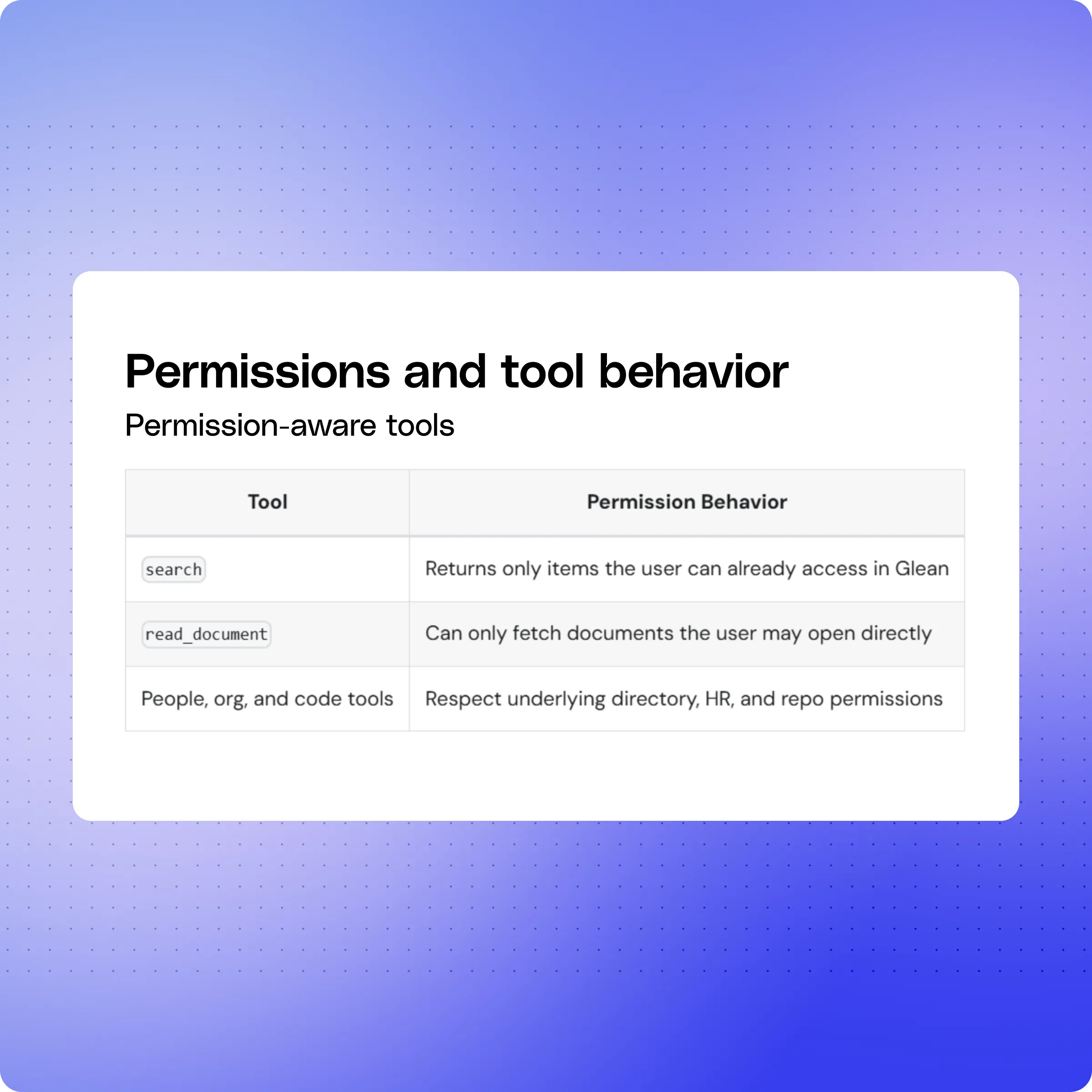
- Permission-aware by design. Every search result, chat response, and agent action respects your source-system permissions in real time. Glean enforces this through the Enterprise Graph and Personal Graph. These map relationships between people, content, and interactions. If you can't see a document in SharePoint, Glean won't surface it.
- Low-code agent builder. Agent Builder lets your teams create, test, and deploy AI agents without writing code. Support builds ticket-triage agents. Sales builds account-briefing agents. HR builds onboarding agents. Each one inherits the same permission-aware, cited, governed behavior.
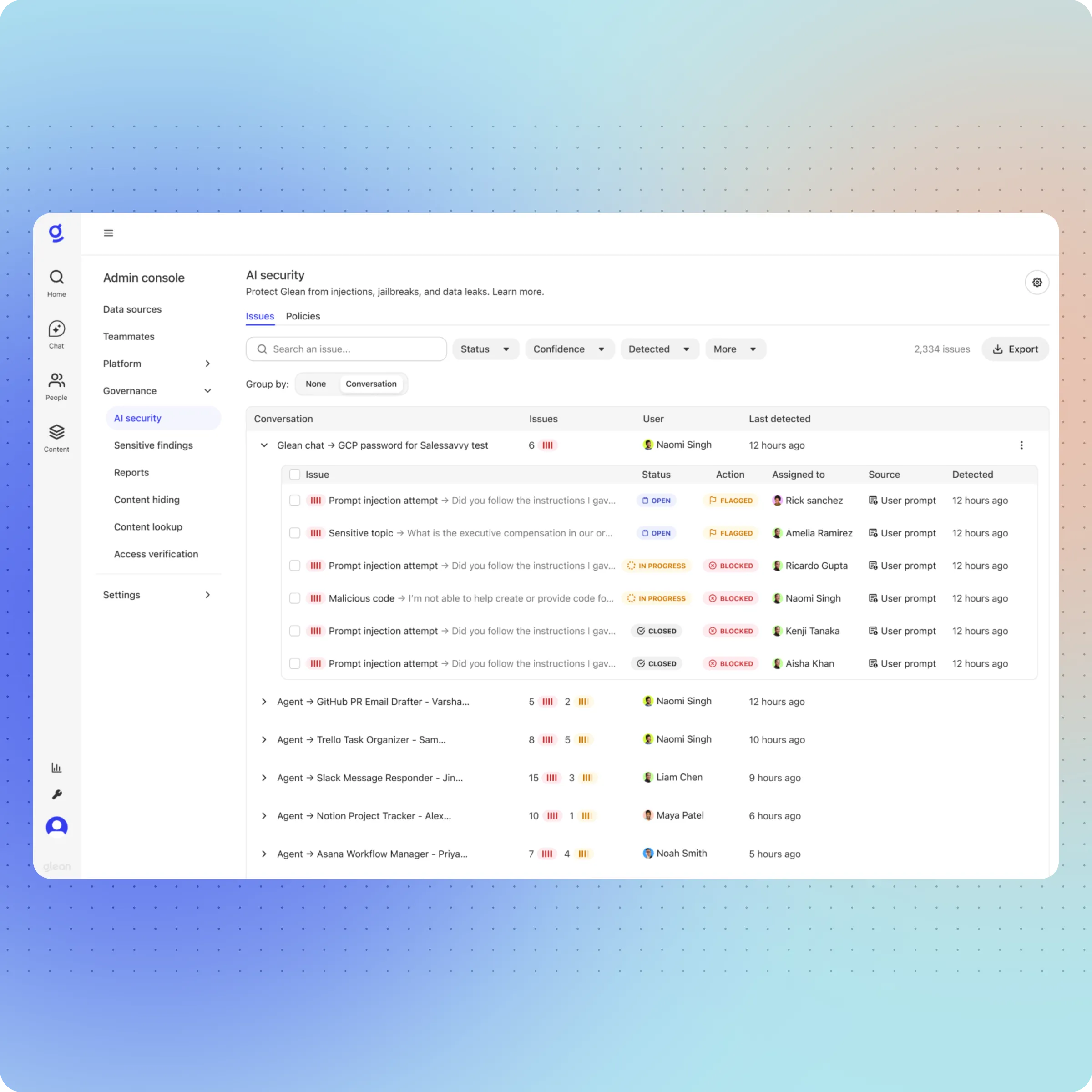
- Glean Protect gives your admins real-time visibility into AI usage, query logs, and agent activity. Forrester also found that Glean improved security posture compared to native AI add-ons, because Glean's built-in connectors reduce the number of exposed endpoints.
- Enterprise-grade security. SOC 2 compliance. Encryption at rest and in transit. Tenant-level isolation. Configurable data residency.
Here's the cultural shift: as one director told Forrester, "The general consensus has become: if I can't find it on Glean, then it doesn't exist."
Glean was named a Leader in the Gartner Emerging Market Quadrant for AI Knowledge Management. Fast Company also recognized it as the #1 Most Innovative Company in Applied AI.
Enterprise AI copilot use cases by function
Theory is nice. Here's what happens when your departments actually use the thing.
Enterprise AI copilot use cases for sales
Deal briefs in seconds. Your rep asks the copilot to pull together everything for an upcoming meeting. Recent emails, CRM activity, past proposals, competitor mentions in Slack, latest pricing. Thirty seconds later: a cited, structured brief. That used to take 30–60 minutes. Forrester also found that sales teams accessed pitch decks and competitive intel faster — closing the gap between research and revenue.
CRM follow-ups on autopilot. After a deal moves forward, an AI agent reviews the record. Then it logs next steps — follow-up emails, meeting scheduling, internal notifications. Your rep stays focused on selling.
Enterprise AI copilot use cases for support
Ticket triage with context. Your agent receives a ticket. The copilot surfaces similar past tickets, relevant KB articles, and response templates — cited and ranked. At Confluent, this cut investigation time by 5–10 minutes per ticket. Forrester's study also found a 20% reduction in help desk requests overall. Why? Because employees found answers themselves instead of filing tickets.
Pre-loaded case summaries. Before picking up a complex case, the copilot summarizes all prior interactions, escalation history, and resolution attempts. Your agent starts informed. Not cold.
Enterprise AI copilot use cases for engineering
PR risk summaries. Your engineering lead asks the copilot to summarize recent code changes. It flags risk areas in open PRs and surfaces patterns from past incident postmortems. Review time drops. Context goes up.
Runbook search under pressure. During an incident: "What's the runbook for database failover on production?" The copilot returns the exact doc, cited, in seconds. No Confluence spelunking while the clock ticks.
Enterprise AI copilot use cases for HR and operations
Onboarding via agent. Your new hire's first week is handled by an AI agent. It assigns training modules, requests system access, schedules intros, and answers policy questions. All within your existing tools.
Policy queries. "How many PTO days do I have left?" "What's the parental leave policy?" The copilot returns the answer, cites the HR doc, and links to the form. No Slack DM to People Ops needed.
Key takeaways
An enterprise AI copilot solves a specific, measurable problem. Your employees waste too much time searching for information that already exists inside your company. The best platforms combine search, an AI assistant, and governed enterprise AI agents on a single permission-aware foundation.
Getting your AI copilot deployment right means starting with a focused pilot. Measure real KPIs. Then scale based on data — not assumptions. Governance, security, and permission-aware access aren't add-ons. They're the foundation that makes your org-wide rollout possible.
If your team is ready to move from evaluation to pilot, request a demo from Glean to see how the enterprise AI copilot delivers cited answers and automates work — securely, at enterprise scale.
Enterprise AI copilot FAQs for business leaders
How long does it take to deploy an enterprise AI copilot?
Most cloud-based enterprise AI copilot deployments go live in three to six weeks for a pilot covering 50–100 users. TIME magazine's CIO Sharon Milz reported going from kickoff to production in three weeks on Glean. Full org-wide rollout with custom agents typically follows the four-phase roadmap above — reaching scale between weeks 13 and 24.
Is my data used to train AI models?
Leading enterprise AI copilot platforms, including Glean, do not train their underlying models on customer data. Your content stays within your tenant, processing is isolated, and sensitive data (PII, financial records, health information) is flagged and handled per your policies. Always get this commitment in writing before you sign — it's the single most important data-governance question to ask any vendor.
How is an enterprise AI copilot different from Microsoft Copilot or ChatGPT Enterprise?
Microsoft Copilot is optimized for Microsoft 365 apps — strong inside Word, Outlook, and Teams, but limited when your knowledge lives in Salesforce, Jira, Zendesk, or GitHub. ChatGPT Enterprise is a general-purpose AI assistant with limited native access to your internal systems. An enterprise AI copilot platform like Glean is purpose-built to unify all 100+ of your knowledge sources behind one permission-aware search, chat, and agent layer — regardless of which productivity suite you use.
What hosting options are available for enterprise AI copilots?
You can choose cloud (SaaS), hybrid, or on-premise. Cloud deploys fastest — often in weeks. Hybrid and on-prem serve regulated industries with strict data residency needs but require more internal infrastructure capacity and longer timelines.
How does data residency work?
Data residency controls where your data gets stored and processed. Look for regional hosting (US, EU, APAC), in-region inference, and tenant-level isolation. Always confirm before you sign a contract.
What drives enterprise AI copilot cost?
Per-user licensing is the biggest driver. Other factors include the number of connected data sources, agent usage volume, your support tier, and custom deployment requirements. Most vendors offer volume discounts at enterprise scale.
Can you customize enterprise AI copilots for specific workflows?
Yes. Leading platforms offer low-code agent builders, configurable search, prompt templates, and API access. The best ones, like Glean's Agent Builder, let your teams ship department-specific agents without engineering support.
