







Automation technologies have empowered businesses across the globe to streamline their processes reducing cost, time, and error. However, most rely heavily on programming.
But not all business owners are tech-savvy.
No-code automation, as the name suggests, is a workflow system that helps people and organizations set up processes to automate their work without any code or programming.
Earlier, most of the automation was dependent on writing complex code and that was dependent on developers. Thanks to no-code, there is no or low requirement of code and lesser requirement of a developer.
Businesses, large, medium, and small can in no time automate their processes by implementing no-code automation. Setting it up, however, requires some initial work and some excellent no-code automation tools.
This complete guide is created specifically to help you understand everything about no-code automation. As we move forward, we’ll talk about everything in detail so by the end of it you know what you can expect from no-code automation and whether this system will work for your system or not?
There are a lot of things to understand along with a lot of questions to uncover, so without wasting any time let’s deep dive into the world of low-code automation.
What is no-code automation?
No-code is the technique of developing software applications without using any traditional coding or programming skills.
No-code automation, however, refers to the use of no code automation software that enables even non-technical users to automate repetitive tasks and processes to streamline and enhance business operations. There is no need to write any code as you can use a graphical, drag and drop interface that comes with ready-made integrations, and pre-built templates to create automated workflows based on your trigger action.
Here, it is important to understand that even though it is no-code, then too code is heavily involved, not at the forefront, but in the background. No-code platforms just mask the code for users like you and me behind a clean interface so we don’t have to write the code or are not dependent on a developer or programmer to do the same for us.
No-code vs. low-code vs. traditional development
When we talk about automation, it’s either traditional automation, low-code, or no-code automation. And each is defined by how much coding and customization it requires.
How does no-code automation work?
Automating without writing even a single line of code not only breaks the domination of developers, but puts the power back into the hands of people who understand the business side of it.
So instead of trying to explain what workflow you require, you can just go ahead and build it yourself thanks to the foundational components of the wonderful system of no-code automation.
- Visual workflow builder
It is the central design interface where you can build and automate your workflow. There’s no coding complexity and to top it up you can visually understand what process connects to what and how it operates.
Typical no code automation tools provide drag and drop workflow editors, flowchart style maps, step-by-step process.
- Integrations and connectivity
Integrations are highly important for automation as even a single workflow is dependent on multiple platforms and applications. It allows for seamless data flow across systems.
Be it syncing customer data across platforms, connecting CRM tools, or transferring data between databases.
- Templates and pre-build workflow models
Pre-build workflows and templates act as a starting point that can be customized according to the user and their business.
It allows for simplified onboarding, reduced design errors, and faster deployment.
- Analytics and monitoring
Monitoring of a workflow helps users track the performance making sure the automation remains reliable and optimized.
You can keep a tab on the success and failure of a workflow, how it is performing, report errors, and even share insights.
- Trigger
Trigger is the event that initiates and defines when an automation begins.
It can be after you receive a customer registration, an email, a form submission, or a data entry into your system. So basically, it is the first step of your workflow.
- Action
Action is what follows when a trigger is activated.
It is the next step of the automation workflow that might include updating records, sending a reply, assigning the task to a team member, and other such sequential actions.
- Logic and conditional rules
Through this you can make decisions based on data or conditions. If/then, multi approvals, filtering rules, all of it comes under logic and conditions.
For example if the system receives a registration from an old user then send email B and if it is from a new user then send email A.
- Schedule and time-based automation
Your workflow can be run at defined intervals or at different time conditions. You can even schedule when to start, continue, or stop.
It can be generating daily reports, or sending reminders after ‘n’ number of hours, or time-based engagement sequence.
- Testing and debugging
You can test a workflow before you deploy it. It increases reliability while reducing operational risks.
You can start with step-by-step validation, detect error, and even use the workflow in a simulated environment.
What are the benefits of no-code automation?
The first and foremost benefit is it saves time, minimizes errors, reduces operational costs while helping businesses automate repetitive tasks and processes. It also enables companies to streamline operations and reduce manual tasks.
The rest are listed below.
- Accessible to tech and non-tech users
No-code tools are designed to be used by people irrespective they come from technical or non-technical backgrounds making it accessible to all. It also allows for less divide and more ownership across teams.
- Increased productivity and efficiency
When you automate repetitive tasks, you automatically free up valuable time that can be focused on more meaningful tasks increasing your productivity and efficiency.
- Speeds up development and deployment
A no-code automation platform or tool requires no coding to build any workflow or solution. It can be developed in a few minutes or hours and then deployed thereafter.
- Accelerates operations and innovation
The workflows can be created based on data or new ideas can be tested and even modified without getting stuck into the long development cycles.
- Empowers non-tech teams, reduces dependency on IT teams
Professionals across HR, marketing, operations, accounts and other non tech departments become self-sufficient as they can easily create workflows freeing up IT resources.
- Higher visibility and control
Since most tools are visual builders, they are easier to track, monitor, and optimize in real-time. It not only gives the user higher visibility but also complete control of the workflow with insights.
- Boosts compliance and standardization
No-code platforms come with pre-built templates and best practices that help ensure compliance with industry standards and regulations.
- Supports scalability
Automation platforms are built to scale. You can share the workflow you built with your teammates and across departments.
- Subject matter expertise
It’s the business teams that understand which processes are to be prioritized to be automated and streamlined. With no-code tools the line of business can leverage their expertise.
Types of no-code automation
There are multiple no-code automation solutions available and all assist with automating workflows, but the way they do might differ from one another.
Let’s first take a look at the types of tools and then how they work.
- Business process management (BPM)
Think end-to-end process, think BPM.
BPM uses various methods to discover, model, analyze, measure, improve, streamline, and optimize business processes. BPM suites with the incorporation of analytics, monitoring, and decision management can coordinate people, information, processes, and systems to achieve the desired outcomes.
Six sigma and lean principles are two of the best examples of business process management.
- Business process automation (BPA)
Streamline day-to-day operations.
BPA automates complex and repetitive processes to smoothly streamline day-to-day operations by customizing various technologies and multiple enterprise systems according to the organizational requirement.
Process automation, intelligent automation, task automation all come under BPA.
- Robotic process automation (RPA)
Perform repetitive tasks between enterprise and applications.
Process-driven, RPA bots follow the procedures defined by a user to perform high-volume business activities. RPA tools to remain competitive are now using intelligent automation technology so it not only does a defined task, but thinks and learns using data.
It can be implemented in systems where you don’t have APIs or deep integrations.
- Artificial intelligence (AI)
Act independently without the need for human intervention.
Machine learning (ML) and natural language processing (NLP) is incorporated in many no-code tools to enhance automation. You describe the task you want to automate and AI builds it for you. ML algorithms help in continuously improving accuracy and reduce errors as they are exposed to more data and learn from every experience.
Chatbots, AI agents, AI-powered assistants are some of the examples.
Now that you know the types of no-code automation solutions, let’s dive into the ways they work.
- Prompt-based no-code
Give the tool prompts or instructions via text to process and then perform accordingly. Think of Siri, Gemini or ChatGPT.
- Text-based no-code
Tools based on this approach guide users textually to automate their processes. As they are text-heavy, users may find it difficult to visualize the flow. Zapier, Notion are text-based tools.
- Visual no-code
Your workflows and automation are displayed in a visual graphical format that lets you view and understand how they work. Make, Bubble, Kissflow fall into this category.
Use cases and real-world examples for no-code automation
Now you know a lot about no-code automation, but do you know where you can use this technology? Let’s look at some of the industries that use no-code automation and also in the different ways they use it.
Industries that use no-code automation
- Information technology (IT)
- Insurance
- Retail
- Finance
- Healthcare
- Telecommunications
- Agriculture
- Real estate
- Education
- Media
- Departments that use no-code automation
Marketing
Ask any marketer and they will tell you about the struggle of repetitive tasks and juggling multiple tools. Marketers can use no-code automation for
- Social media
- Automatically share post on multiple platforms when you publish a new blog
- Auto repurpose high performing content across platforms
- Track when a brand is mentioned by influencers or users
- Lead capture
- Capture lead from landing pages, ads, campaigns, and other digital engagements
- Categorize them based on demographics
- Send personalized emails and follow ups
- Tracking and monitoring campaigns
- Gather data from multiple platforms like email, CRM, advertising platforms
- Consolidate it into structured reports and generate summaries
- Identify gaps, trends, and opportunities faster
Zapier helped Grammarly’s marketing team to sync leads from platforms and handle email opt-out requests.
Using Zaps, Grammarly automated lead routing and improved plan efficiency by 37% and reduced errors by 87% and detected and processed email opt-out requests automatically.
Sales
These people are at their best when they have all the information and processes as they are the direct line to the company for the customers. What can they automate
- Qualify leads
- Add quality leads to your sales pipeline based on engagement, behavior, buying intent…
- Notify and assign high quality leads to specific sales rep
- Re-engage inactive or dormant leads
- Sales pipeline
- Move prospects through pipeline stages based on certain actions
- Schedule meeting reminders, follow up emails, and demo calls
- Generate timely pipeline performance reports for transparency
- Documentation
- Create proposals, quotations, contracts by pulling up customer details, pricing, other information
- Identify interested prospects by monitoring when these documents are opened or signed
- Save final documents in a centralized system for better record management
Mawer Capital was facing three issues that were solved by integrating automation systems using Typeform and Make that helped them save 70%-80% of the time and speed up workflow by as much as 93%.
Manual client onboarding was delaying production, lead prioritization process was inefficient, and data formatting was a complex process for them.
Human resource
HR teams are busy finding, recruiting, onboarding, managing, and adding value to people. Not to mention juggling between the management and the team. They can automate a lot of processes
- Candidate screening
- Capture resumes from job portals, company page, social media, emails, referrals
- Filter applications based on the selected criteria and inform team leads
- Update candidates through timely communication at different stage of the process
- Onboarding
- Once the offer is accepted, trigger onboarding forms, policy sharing, document submission
- Inform IT and other involved teams to create credentials, accounts, share access
- Enroll employee in training program, share schedule and training modules
- Employee engagement
- Send wishes to employee on birthday, work anniversary or other milestones and achievements
- Automate reminders for wellness programs, in-house activities, meetings, organizational news
- Send timely OKRs, feedback and surveys, satisfaction polls
Providing in-home care service, Comfort Keepers required a platform that was customizable to organize their hiring process.
Erin implemented the software on her own without needing any assistance. The initial plan was applicant tracking but after realizing she could do so much more with Pipefy, Erin now uses it for recruiting, onboarding, invoicing, time-off request management, and more.
As of 2023, Comfort Keepers has saved over 20,000 working hours.
Finance
Their love for spreadsheets and numbers, and data makes the finance team the perfect department that needs big time automation
- Invoice and billing
- Generate invoice by pulling up customer data and share them immediately after generation
- Send reminders on upcoming, missed, or pending invoices
- Save records in a centralized system for access and compliance
- Expense and reimbursement
- Forward expense claim directly based on concerned departments or expense category
- Validate and check expense against company policy, documentation or category
- Store invoice details, generate reports, check compliance
- Financial reporting
- Collect data from multiple sources including accounting software, bank account, payroll software
- Match internal records with external records to identify gaps and discrepancies
- Collect insights to create report and send it to stakeholders
cfX’s team needs to complete complex operational requirements and regulatory compliance deadlines.
Implementing the no-code workflow automation assisted them in the SEC and MSRB compliance framework, making tasks and deadlines visible across the organization.
Customer support
Customer support reps are superheroes as they are the ones who come into firing lines of customers when they face issues. They need automation for a lot of processes including
- Customer interaction management
- Log support conversations, service records, issues and solutions in your CRM system
- Tailor support responses based on customer history
- Transfer customer support insights to other departments and teams to improve customer experience
- Knowledge base and self-support
- Automatically recommend articles, guides, and FAQs for basic queries
- Update knowledge base based on different queries
- Monitor and track the value provided by self-support guides
- Ticket creation
- Convert emails, social media DMs, website forms into support queries
- Classify tickets based on category, urgency, or type
- Alert team members in real-time for new or urgent tickets
Flutter was looking to enhance its customer operations and improve customer experience. Managing high volume of customer enquiries and providing quick and accurate response was required to reduce customer attrition.
Besides an FAQ bot, Flutter implemented responsive workflows that enabled them to address customer queries in real-time even in times of peak demand automating around 80% of their support journey.
Personal use
Who said that only professionals can use no-code automation to improve their productivity? According to Zapier, 76% of no-code users use no-code tools for their own personal projects.
You can also use it to streamline your personal workflows.
- Health, wellness, and habit tracking
- Activate reminders for drinking water, workout sessions, reading, or even power naps
- Collect data from fitness apps or health trackers to monitor your goals
- Prompt motivational reminders, journaling, meditation
- Knowledge update
- Transfer emails, articles, video that you mark in a designated folder or app
- Track and prompt for course completion, certificates, reading, learning language
- Update you with current happenings on your selected areas of interest
- Finance
- Record and share your weekly or monthly spending by capturing your transactions across apps
- Set timely reminders for bills, rents, EMIs, subscriptions
- Monitor your spending, saving and investment goals
Common myths, questions, and risks of low-code automation
Like it happens with every trend, every tool, every technology, no-code automation also comes with its share of myths, challenges, and risks. We promised to give it all to you, so why shy away from it.
- No code automation is only for simple tasks.
Modern tools are designed to handle simple as well as complex workflows as they support complex logic, multi-step process, conditional branching, and multi integrations, so this one is just a myth.
- These platforms have replaced developers.
Again a myth. No-code has just reduced the dependency on developers and programmers for tasks that can be handled by non-tech teams.
- Security and reliability is a concern.
These tools have to follow data encryption and compliance protocols. However, it is always recommended to evaluate vendor security policies and access controls before you use any tool.
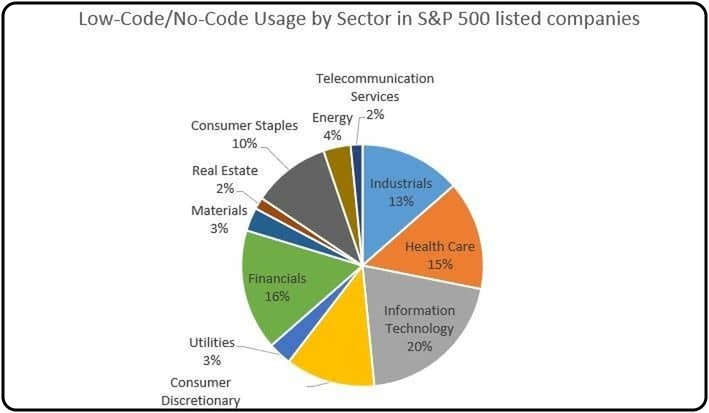
- No-code automation is best suited for SMEs and not large enterprises.
We will let the data do the talking here.
According to Spreadsheetweb’s 2021 research, 38% of Fortune 500 companies used a no-code platform in 2021. Just imagine where that number would be today.
Source: Spreadsheetweb
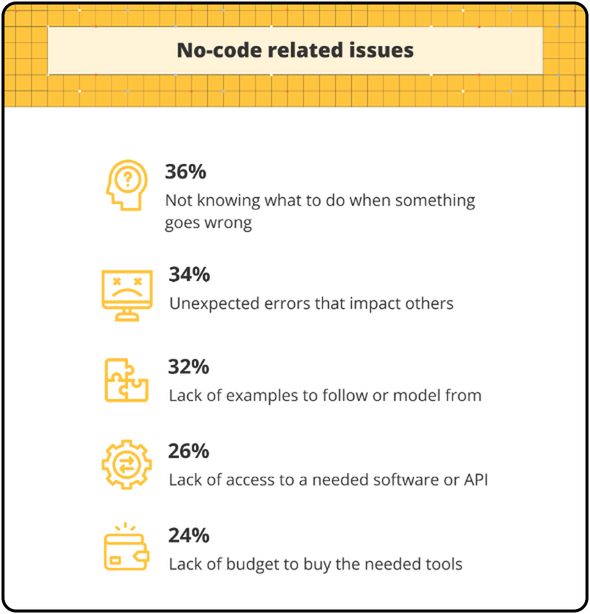
- What are the challenges faced by no-code users?
According to the no-code report by Zapier,
36% of the people surveyed do not know what to do when something goes wrong
34% face unexpected errors that impact others
32% of respondents identified a lack of example to follow
26% found lack of access to a software or API
And 24 % recited lack of budget to buy the needed tool
Source: Zapier
- Are there any mistakes to avoid when using no-code workflow automation?
If you’re following a not-so-great manual process (bad, I mean), don’t make the mistake of automating it and thinking it’ll do better. Automating a bad workflow will only amplify the problems.
- What is a hybrid approach and who should use it?
Hybrid approach combines the use of no-code, low-code and traditional development. You can make use of this approach for highly specialized systems such as workflows that require deep backend customization.
- Is there a checklist when looking at no-code workflow automation tools?
Look for
- Ease-of-use
- Customization
- Unique features
- Pre-build workflows
- Integration capabilities
- Minimal learning curve
- Security and compliance
- Scalability and flexibility
- Pricing models
- Customer support
- What are the best no-code automation tools?
This answer would require a special piece. We will come to it soon.
Would no-code automation work for your people, processes, and business?
Choosing the right no-code automation tool can be tricky.
Why is it tricky?
Because what works for one organization might not work as well for another. However, the beauty of no-code automation is that it serves everyone, regardless of the industry or department.
There are multiple tools available and there is one that can work for your people, processes, and business. It’s just that you have to understand which tool lets you build smarter, scalable systems eliminating tedious work while streamlining and optimizing processes without writing a single line of code.
Future of no-code automation
The future of no-code automation and artificial intelligence are closely linked.
Modern platforms are being designed to be more intelligent, intuitive, and strategic. We can expect voice-activated workflows, IoT driven processes, personalized automation, hyperautomation that might combine AI, RPA, analytics, and more.
No coding experience needed, no need to carry out manual tasks, no dependency on a programmer. If these aren’t enough reasons to believe in the future of no-code automation tools, then believe these
The no-code/low-code market reached $26.9 billion in 2023 and is predicted to grow to $65 billion by 2027. (Quixy)
80% of low-code users, by 2026, will be outside of IT. (Gartner)
Software developers who use no-code/low-code make cloud-native applications 10x faster that too with 70% fewer resources. (Forrester)
No-code empowers non-tech teams and citizen developers (non-technical professionals) to build even the most complex of workflows that are easy to monitor, optimize, and deploy. As a result, your organization not only increases productivity, saves on resources, but also becomes data-driven and agile.
Take the step to transition your business from being reactive to proactive. Get started with no-code automation today. We’re here to guide you every step of the way.

