









.webp)
We’re happy to announce today that Glean is now an official Slack Marketplace app. Enterprises can access trusted, permissions-aware data right from within Slack—and bring Slack data together with all your enterprise context in Glean. Glean is the first place you can go to jumpstart your work, right in your browser, and in the apps you use every day, like Slack.
Slack is the chat experience where employees troubleshoot, hand off tasks, and ideate through conversations. Glean captures these conversations in Slack, alongside data from Jira, GitHub, Salesforce, Confluence, and 100+ other apps, to give you a complete view of your work. That means when you’re generating ideas, you’re not operating in a vacuum—you have the context from previous conversations and interactions. For example, when you’re troubleshooting, you can draw on live updates across all your favorite developer tools. When you’re making decisions, you’re guided by actual enterprise data and a Glean Assistant that knows how your company works. Get answers from Glean right inside Slack without switching apps, or get AI answers on all your enterprise context from within Glean.
We’re also extending Slack support to the Real‑Time Search API, a live feed of your conversations in Slack that unifies with your enterprise knowledge across 100+ apps to provide a complete, up‑to‑the‑moment view of work. Glean’s support for the Real-Time Search API reflects our commitment to an open ecosystem where customers can connect to any app, own their data, use any AI model, and build on any cloud or agent framework.
By joining the Slack Marketplace, we make it possible to bring Slack real-time data into Glean. We’re also expanding what Glean can do in Slack with daily digests that aggregate updates across your enterprise context on the topics and initiatives you care about most. Schedule the digests and they’ll arrive as a Slack DM—so you can review yesterday’s action items and today’s next steps without spending hours searching across apps.
Glean in Slack now also runs on our new Agentic Engine 2, significantly improving the quality of responses and enabling Glean to answer more complex questions. In the examples below, let’s see how Glean and Slack are being used together by leading enterprises to move productivity forward.
Four ways to increase productivity with Glean and Slack together at work
1. Deflect HR and IT tickets

Easily find answers to common IT and HR questions without submitting support tickets. When team members ask questions in Slack, Glean proactively and automatically surfaces relevant information from across your company's knowledge base—including IT documentation, HR policies, onboarding guides, and previous ticket resolutions—delivering accurate answers in seconds. This self-service capability significantly reduces the volume of repetitive inquiries about password resets, benefits enrollment, PTO policies, and software troubleshooting that typically flood IT and HR queues.
In addition to getting responses, users can also take actions like creating JIRA or ServiceNow tickets to raise requests directly from Slack through Glean. By deflecting routine tickets at the point of question and making it easier to follow up on action items, Glean not only decreases response times from hours to seconds but also frees up IT and HR teams to focus on complex issues that truly require human expertise.
2. Quickly catch up on projects to prep for a meeting

Stay in the loop by asking Glean to “catch me up on Project X,” and it will scan your Slack threads, docs, tickets, PRs, and calendar notes to deliver a crisp summary of progress, blockers, decisions, owners, and upcoming milestones with links to sources. In seconds, you get a ready-to-share brief and suggested talking points for your next meeting, so you walk in fully up to speed and walk out with clear next steps.
3. Stay on top of your action items for a product launch
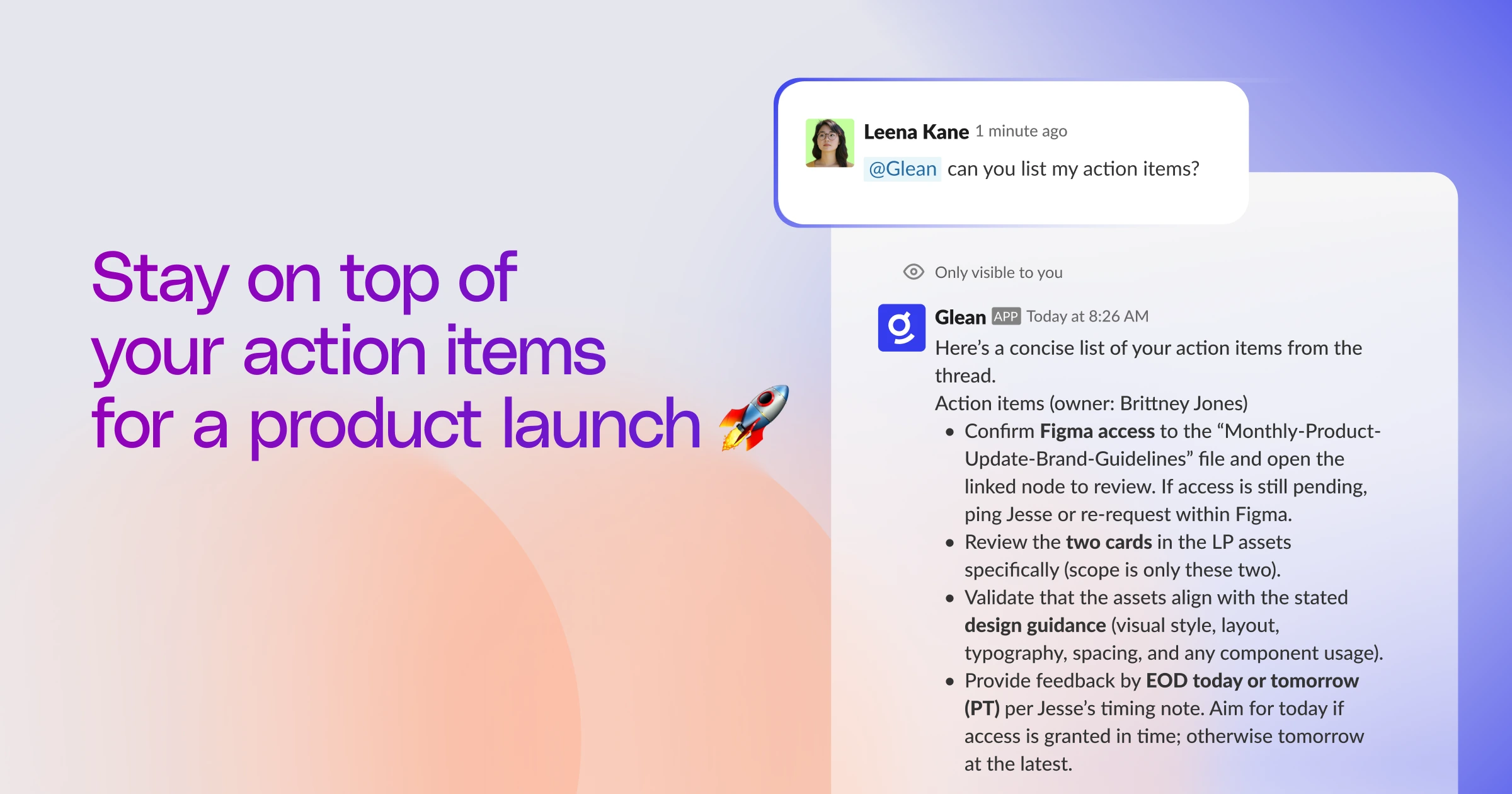
Glean in Slack can quickly sift through a multitude of sources to keep you informed on campaign launch progress and any key blockers. It can easily scan briefs, launch checklists, Slack threads, tickets, PRDs, and calendars to surface what’s shipped (messaging, assets, enablement), what’s in review, and what’s blocked—calling out owners, dates, channel dependencies, and risks with links to sources.
In seconds, you get an exec‑ready snapshot plus suggested next moves (e.g., unblock approvals, rebalance timelines, coordinate enablement), so staying on top of launch progress and sharing updates in Slack is easy and quick. And when your team has questions, you can quickly tag @Glean in Slack to help find the answer or create a JIRA ticket to follow up on.
4. Monitor and understand customer feedback

Stay on top of customer feedback by setting up your daily digest so Glean can proactively collect, summarize, and share feedback from your customer support tickets, Slack threads, emails, meeting notes, and docs. At the same time every day, Glean provides you with the latest overview so you can see top pain points by account or segment and pull representative quotes with source links.
It’s also straightforward to dive deeper on any particular Slack channel if you want more information—just use the Glean sidebar to ask about recurring themes or patterns and you’ll receive a concise summary that can be easily shared.
These are just a few of the ways to unlock the power of Glean in Slack.
Get started with Glean in Slack today
Slack, along with 100+ native connectors, is available to Glean customers today. Go to your admin console to set up your connection to Slack and start bringing live data into Glean. It also only takes a few quick steps to start getting your questions automatically answered by Glean, directly in Slack.
Not a Glean user yet? Get a demo today, and get started with work AI you can trust— grounded in your company's data, built for security and speed.
