





An employee asks their AI assistant to draft a leadership update. They explain which launch they’re working on, provide background, and correct the draft: “Put the recommendation first. Keep the background short.” The following week, they go through the same set of steps once again.
Useful feedback emerges throughout that work. The conversation establishes how the employee wants leadership updates written. Their activity in documents and tickets provides signals about the launch they’re involved in. Carrying that context forward means the next request can build on and learn from what the assistant has already learned.
Glean builds memories from useful context, such as conversations, work artifacts, and connected tools, and applies them to future tasks. The goal is to help employees spend less time repeating instructions and explaining background across sessions, and more time focused on the work itself.
Why chat history isn’t enough
Within a conversation, an AI assistant can refer to earlier messages because the application includes them in the information sent to the model. That information is its context. However, the context window limits how much the model can process in a single request.
A larger context window allows longer conversations and more documents to fit. But starting a new conversation doesn’t automatically bring useful information from the previous conversation along. Last week’s feedback can exist in a previous chat’s history without reaching the model today.
The other complication is that including more history also has a cost associated with it. It consumes tokens and brings along outdated facts, abandoned ideas, and instructions that applied to one task. The model also has to determine which details still matter.
Compaction is essentially the process of summarizing a growing conversation so that it can be efficiently referenced and used later for future conversations. We use the process of compaction and store them as memories. For the leadership update, the useful memory might be one sentence:
For leadership updates, lead with the recommendation and keep the background short.
That sentence preserves the preference without requiring the assistant to reread the entire exchange. Producing it requires the system to identify both the instruction and its scope.
Where memories come from
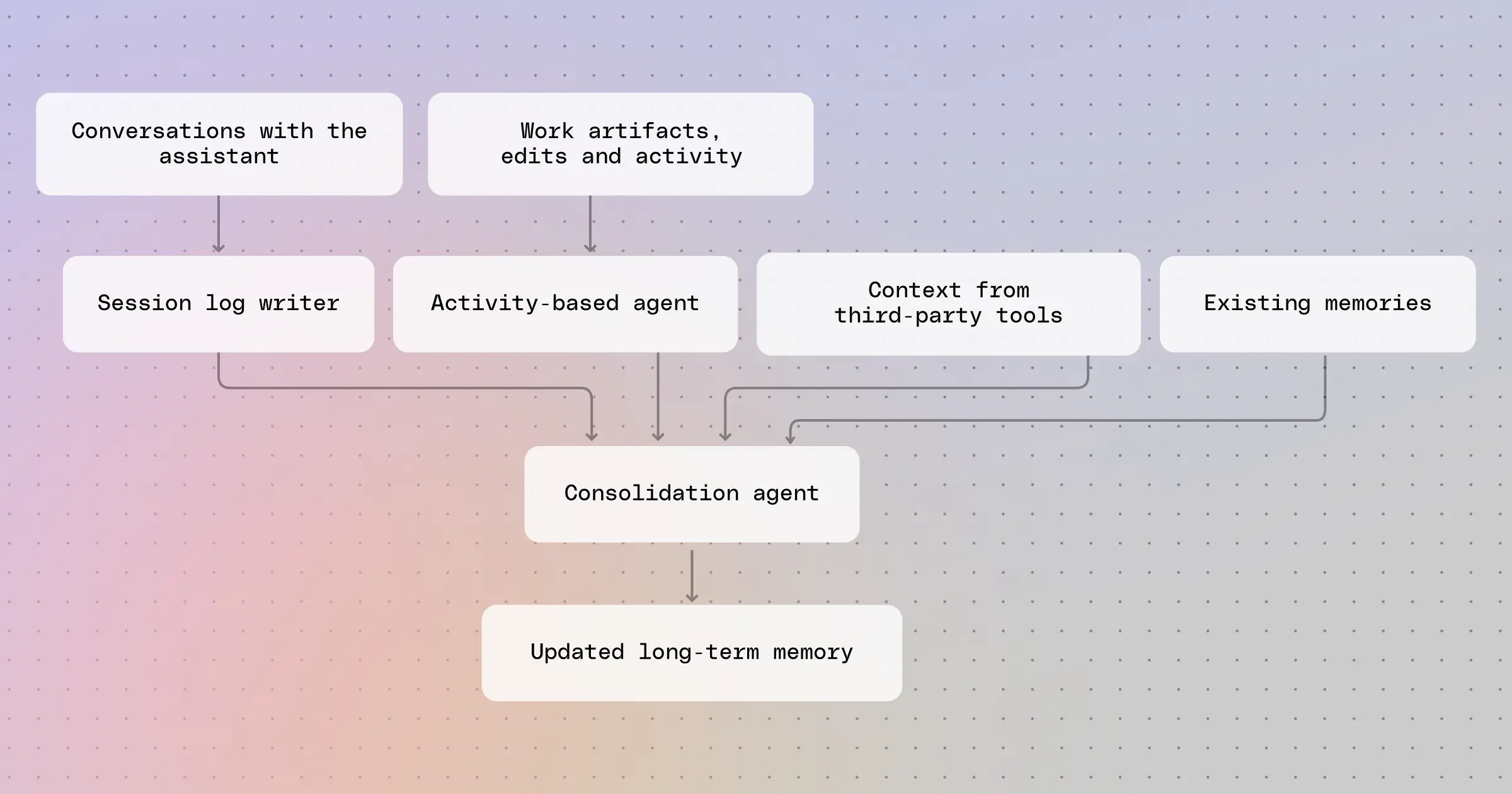
Glean’s memory system draws on three sources:
- Conversations: Glean identifies candidate memories from explicit instructions, corrections, and context shared in chat. Some signals are direct, such as a request to remember a writing preference. Others arise naturally during a task, such as an employee explaining that their responsibilities have changed.
- Work artifacts and activity: Glean learns from documents, tickets, revisions, and the activity around them through a process called Mirroring. If an employee repeatedly edits a launch plan and updates related tickets, those actions can help Glean recognize that they’re working on the launch, even if they never mention it in chat.
- Third-party context: Authorized connected assistants and tools can also contribute memories. This allows context developed outside Glean’s conversations and activity processing to become available for later work, subject to the integration’s permissions and scope.
We have filed a provisional patent application for this unique approach to memory.
Deciding what to keep
Consolidation compares new information with existing memories, merges duplicates, and updates details that have changed.
It also needs to distinguish a one-time request from a lasting preference. “Keep this update short for a two-minute meeting” applies to one situation. “Keep leadership updates short” sounds like a general preference.
Glean stores memories as compact summaries in readable Markdown files outside the model. Saving a memory doesn’t retrain the model. People can inspect, edit, or delete memories, and instructions for the current task take precedence.
Applying memory on the next task
When an employee asks for another leadership update, Glean includes a short memory summary in the model’s initial context. The model can use tools to retrieve more detail. The software that assembles these inputs is often called the harness.
A retrieved preference doesn’t guarantee the model will follow it. Glean needs to test whether the memory improves later, relevant tasks—and is not used for unrelated requests.
Memory is useful, but it is not a perfect solution on its own. Memory can preserve a writing preference, but it can’t confirm whether a launch is on schedule. For that, Glean needs to check recent project updates using search. A preference may stay useful for months but last Tuesday’s launch status may already be out of date.
Learning and continuing across runs
An execution trace records an agent’s actions and tool results. Trace learning examines that record for improvements to personal or shared workflows and updates that agent’s memory. A candidate lesson needs testing on later tasks before its usefulness can be established.
Autonomous agents also need operational state: unfinished tasks, snoozed items, and setup details. Now in beta, Glean Agent Memory can maintain state and memory in files across runs, with information scoped to the agent and editable by users.
Carrying context across assistants
Glean’s memory tools use the Model Context Protocol (MCP) to let authorized connected assistants read and write memories. A future direction for Glean’s LLM Gateway is to index conversations from other assistants as another source of learning, subject to the integration’s permissions and scope.
The next leadership update should benefit from feedback the employee has given and work they have already done. With less context to reconstruct, the employee can focus on whether the launch is ready and what the team should do next.
