








Enterprise work often involves varying degrees of effort and complexity, necessitating that users choose the right model to optimize efficiency and cost—but that results in accepting trade-offs. A frontier model may provide a high-quality response, but comes with high costs and slower speeds. A cheaper model’s answer quality might look fine until someone needs to execute more complex work. Neither approach works as a default for every task.
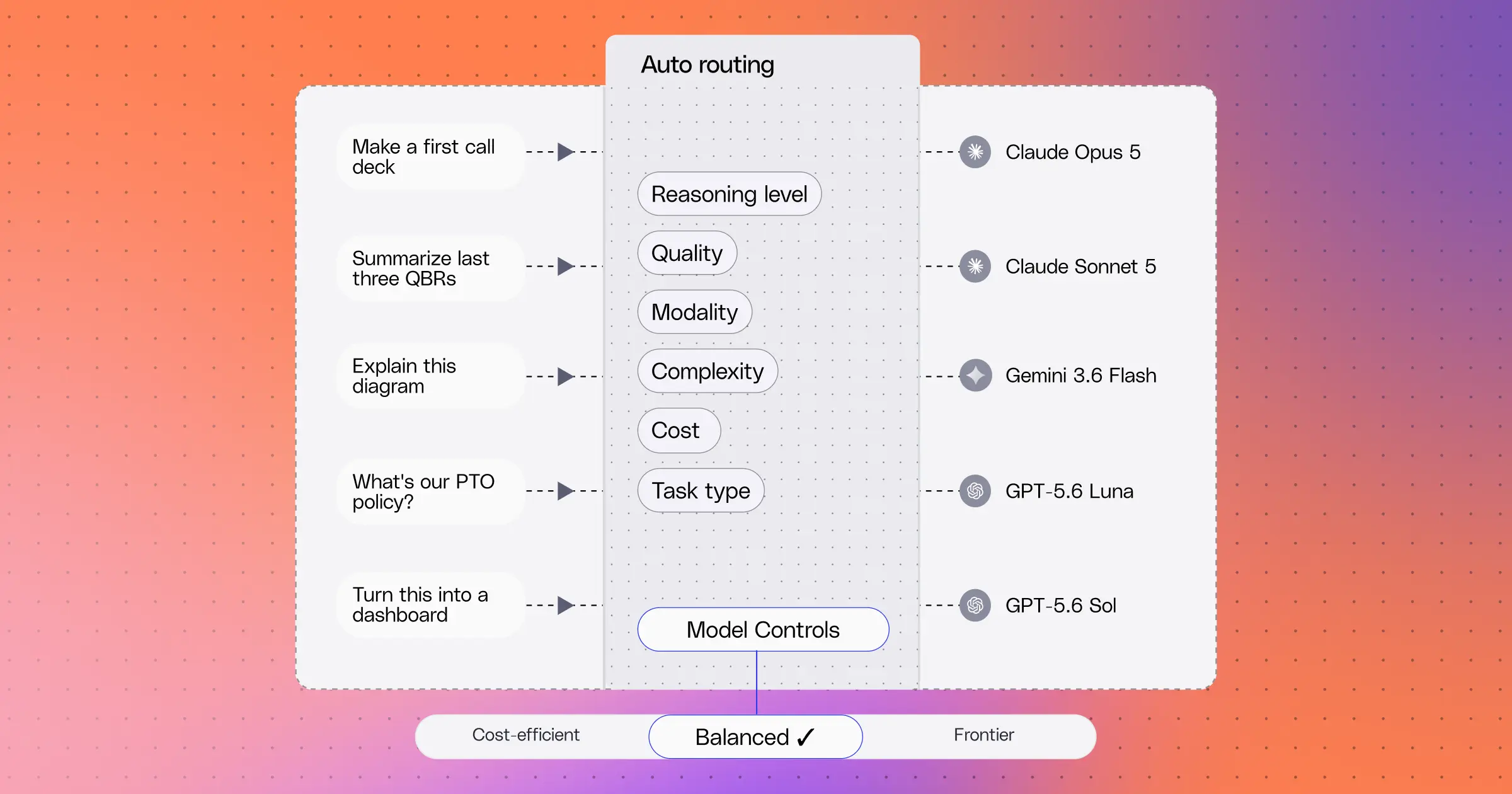
That’s why we’ve built Glean to automatically choose the best model for the job, taking the guesswork out of AI workflows. Auto routing is a feature built on a simple idea: match each request to the model it actually needs to execute the work. Simple questions get faster answers, and frontier models are used when our eval data shows the frontier is worth it.
Fast when it needs to be
About 25% of Glean’s requests are simple lookups: finding a policy, a doc, or a quick fact check. Those go to a fast, lightweight path that searches your company's knowledge, finds the answer, and answers the request quickly while providing the right citations. About one-fourth of questions are handled this way, ensuring faster answers with no drop in answer quality.
For the other ~75% of requests, Glean will work through the response and after a pre-defined stopping point, it will pass it off to the main agent. The agent is provided the context that was already found, like searches, files, and tool results, ensuring the work done initially is not wasted.
Experts where they matter
Some requests require more powerful models with high-level reasoning: an interactive dashboard, an analysis that combines hundreds of results, a deep dive into the pipeline, or a follow-up from someone who just told us the last answer was insufficient. When an economy-level model consistently fails to meet our quality bar, we start to evaluate more sophisticated models. We then compare different models and reasoning levels to find the best model (or reasoning level) for that specific task.
Once we find the best fit for the task, we deem that winning combination as an “expert” for that task. These experts are a specialist model specific to the enterprise use case in question. Once we match the query to the appropriate expert, the expert that takes over the conversation via a handoff. As mentioned, the handoff includes all of the context gathered so the user doesn't have to add back in the context (or waste any additional tokens).
Examples of experts:
- Interactive artifacts: Dashboards, apps, and rich HTML.
- Exhaustive analysis: Questions that need a large set of results combined into one answer.
- Data analysis: Working through spreadsheets, metrics, SQL, and numbers to get to an answer.
- User dissatisfaction: When a user signals the previous answer wasn't good enough.
As we identify new kinds of requests where a specialist model clearly wins, we add experts as needed to ensure similar requests are handled more effectively going forward.
Every expert has to earn its spot
We don't pick experts based on intuition. We evaluate models on real enterprise tasks, have an AI judge compare their answers blind and look for the places where a stronger model consistently wins at a high enough rate to justify the increased cost.
The results:
- Interactive artifacts: Requests for dashboards and apps go to a top design-focused model, because the other models we tested didn't meet the quality bar for visual, interactive work.
- Exhaustive analysis: Answers from a frontier model were preferred 68% of the time, but simply upgrading the reasoning effort on the efficient model provided answers that were preferred 65% of the time at a fraction of the cost.
- Escalation: Answers from a frontier reasoning model were preferred 72% of the time over the default.
These evaluations and experts inform the basis for our auto routing decisions. Experts handle only a small share of requests, so most of your usage stays on efficient models and premium models are used only where they make a tangible difference in quality.
Proven on 5,000 real tasks
Underneath all of this is a large evaluation: 5,000 real enterprise tasks replayed across 37 model-and-reasoning-configurations from 11 models. Each replay restores the original conversation, files, and permissions. The agentic judge doesn't just read the answers. It reruns the calculations, opens the files each model produced, and verifies every statement in the response before scoring.
That evaluation shows how on certain tasks, a higher price doesn’t purchase better results. For example, for one set of sales tasks, a frontier model cost 5x but showed no improvement over an efficient model.
You control the dial
Admins choose a policy for the whole company or for individual departments:
- Economy keeps everything on the most efficient models.
- Balanced, the recommended default, brings in top models from multiple providers for the requests that benefit.
- Frontier uses the most capable models across the board.
If an admin turns a model off, routing uses the next available one. Budget guardrails can also step usage down automatically as a team approaches its monthly limit.
Continuous improvement, better answers
New models come out every few weeks. Each time, we rerun the same process: test, find the wins, check the cost, and add or update experts. Your policy stays the same, and the models behind it keep improving.
Glean Auto Routing ensures the right model for every task, without you having to think about it.
