

Contexte d’entreprise

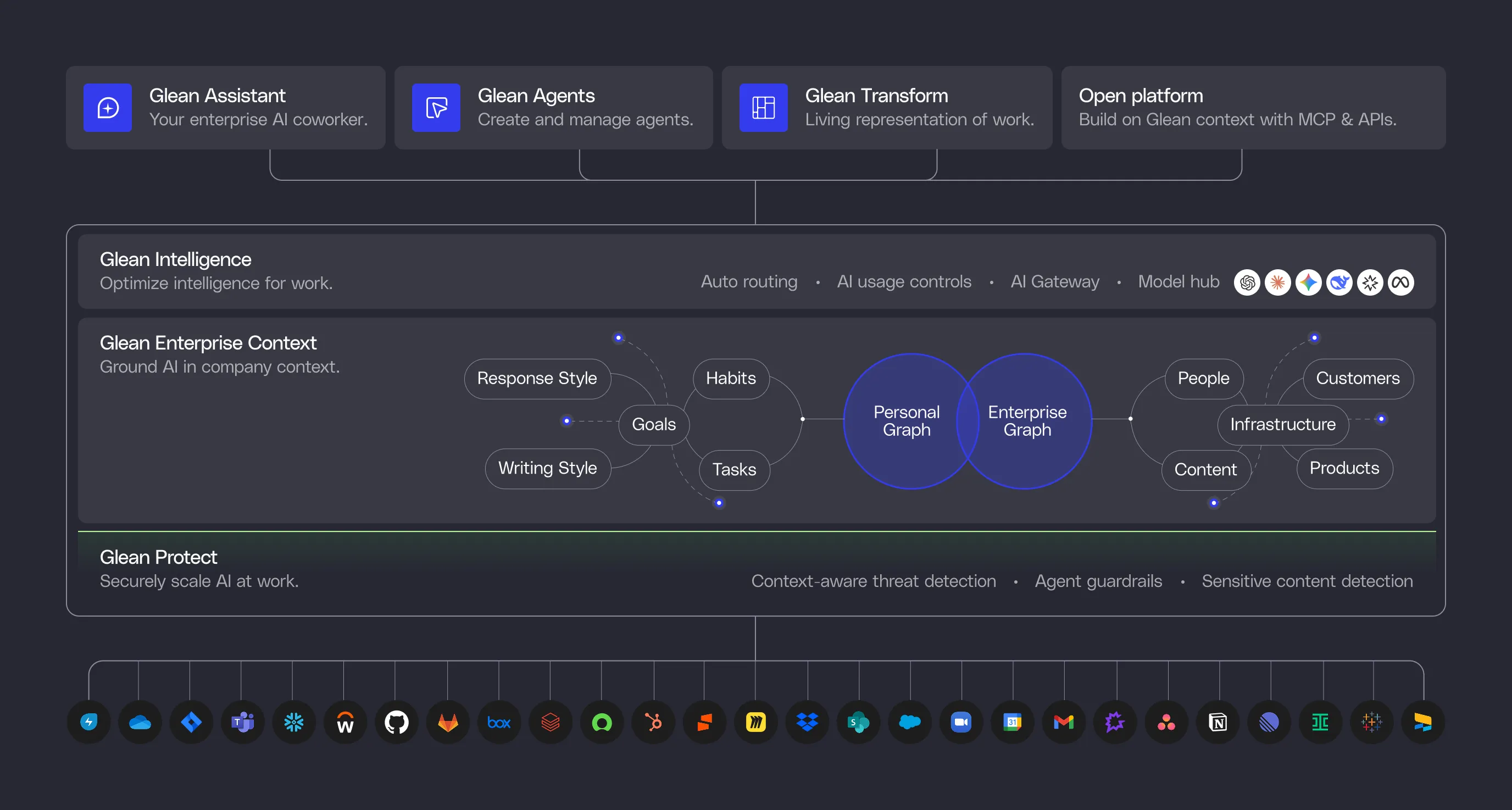
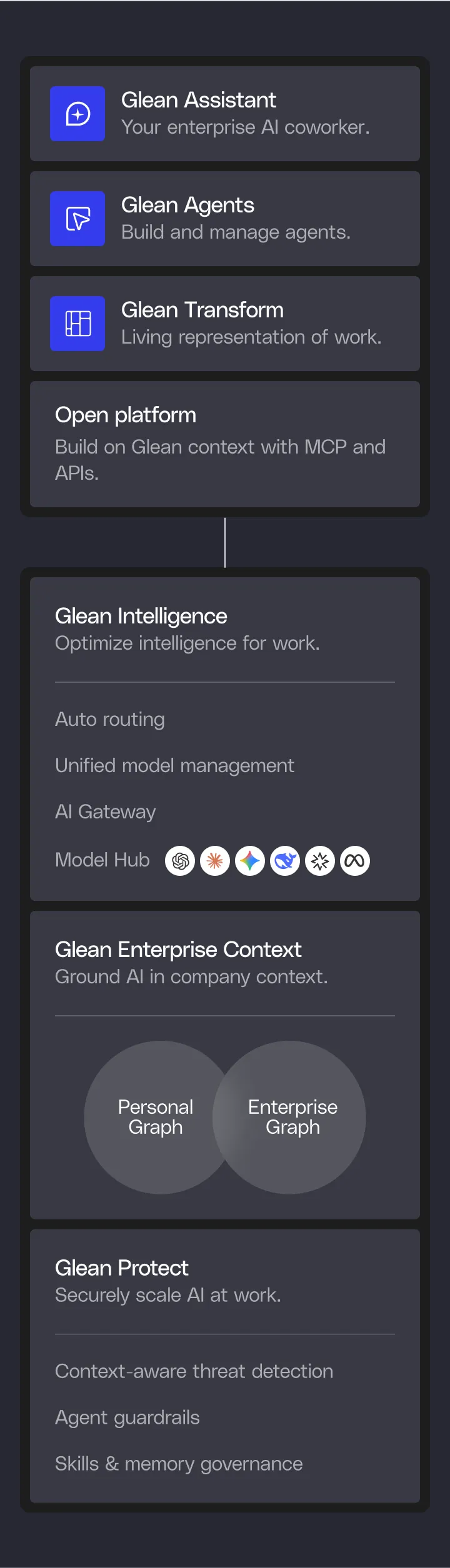
Le contexte est le fondement de l'IA capable de prendre en charge des tâches réelles. Glean crée des connecteurs qui capturent les signaux de l'entreprise, une recherche qui indexe vos données, un Enterprise Graph qui cartographie les relations entre les éléments, et une mémoire d'entreprise qui apprend vos processus — vous offrant ainsi une plateforme dotée du contexte complet nécessaire pour automatiser le travail.

Découvrir Glean Enterprise Context
Diagram showing Glean Enterprise Context connecting Enterprise graph with nodes like Infrastructure, People, Content, Customers, and Products, and Personal graph with nodes like Goals, Tasks, Work habits, Writing style, and Response style.Diagram showing Glean Enterprise Context with two interconnected graphs: Enterprise graph with Infrastructure, Products, Processes, and Content, and Personal graph with Goals, Work habits, Tasks, Processes, and Response Style.
Green gradient background with the text 'Protect AI' and six white circles containing logos of AI companies like OpenAI and Meta connected by thin green lines.Diagram illustrating data protection with interconnected elements including Processes, Products, Content, People, Infrastructure, Customers, Work habits, Goals, Tasks, Response style, and Writing style.Flowchart showing Protect Agents steps: Start with trigger when user fills RFP and Number of questions, respond by extracting first Number of questions from RFP, then loop through each loop item running steps added to the sub-agent.

Glean Protect

Le contexte est puissant, donc il doit être protégé. Glean fonctionne dans votre cloud à locataire unique, protège les contenus sensibles, applique des permissions strictes et valide intelligemment chaque action d'agent. Protect protège vos données et garantit la fiabilité de vos agents.

Découvrir Glean Protect
Workflow diagram showing an RFP Answer Agent setup: user triggers the agent by providing RFP and number of questions, agent extracts questions, loops through each question, and inputs responses in a Google Sheet labeled 'RFP Answer Agent Responses'.Three-step flow showing setup of an RFP Answer Agent: 1) Setting up agent to read and parse spreadsheet questions; 2) Flowchart with trigger on filling RFP and question count, response extraction, and loop through items; 3) Google Sheet titled 'RFP Answer Agent Responses' displaying question columns and sample text.

Agents Glean

Donnez une tâche à des agents, et ils utilisent le contexte et le raisonnement pour automatiser le travail. Glean applique au moment de l'exécution des règles de comportement aux agents afin qu'ils suivent les instructions, mènent les tâches à terme et restent précis — pour fournir un travail réel de manière fiable.

Découvrir Glean Agents

Plateforme ouverte

Indexez vos données une seule fois et utilisez-les partout grâce aux API ouvertes de Glean, au SDK web prêt pour l'interface utilisateur et à la prise en charge MCP sans interface. Et comme votre pile IA continuera d'évoluer, la prise en charge multi-cloud, le choix flexible des modèles et les partenaires de sécurité intégrés garantissent que Glean évolue avec elle.

Découvrir Glean APIs
Search API interface showing a search for 'Q2 Inventory Planning' with a Google doc result and example Python code using Glean API to query 'vacation policy'.Screenshot of a Chat API code snippet showing Python code importing Glean, initializing with an API token and instance, creating a chat with a message to summarize Q4, and printing the response.Screenshot of 'Agents API' with a card titled Lead evaluation and example Python code using Glean API client to create and run an agent with a query input.
Colorful abstract wave with a smooth gradient transitioning from yellow and green to blue and purple.